---
updatedAt: 2026-04-21T04:23:54.000Z
agentTools:
  projectIndex: https://developer.blueshift.com/llms.txt
---

# Add user to list

Use this endpoint to add a user to a custom list.

## API at a glance

**Description:** This API adds a single user to a custom user list using either their email address or customer ID.

## Authentication & testing

<details>
  <summary><strong>Testing the API on this page</strong></summary>

  <h3>How to try it here</h3>

  <ul>
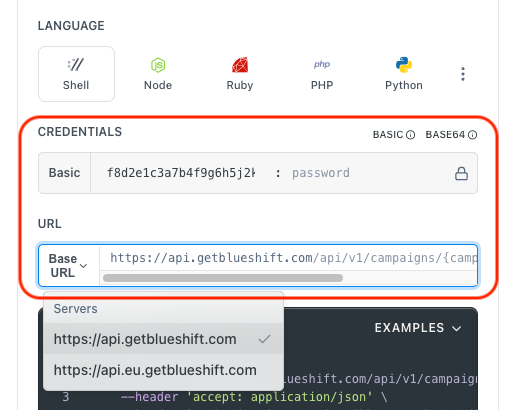
    <li>Use your <strong>User API Key</strong> as the <strong>Username</strong> (leave <strong>Password</strong> blank).</li>

<Image align="center" border={true} width="100% " src="https://files.readme.io/c11a123983769d19ed808108a287068e6ddab2f279c4771a8f34c47fb8c6a40d-Account-Settings-User-API.png" className="border" />

<li>Select the appropriate API endpoint based on your Blueshift region.</li>

    <img src="https://files.readme.io/a567ea5d40fd528b7651d01be5932921690ecbe9786b366284cb2bd48f05ff7d-API_-_Select_Region_-_With_Highlights.png" alt="API - Select Region" width="75%" />

    <li>Enter the necessary parameters and click <strong>Try It</strong> to run the request.</li>
  </ul>
</details>

<details>
  <summary><strong>Authentication using Base64 encoding</strong></summary>

  <h3>Note for developers</h3>

  <p>
    API requests require authentication using HTTP Basic Authentication with an API key.
    The API key serves as the username, while the password field should be left empty.
    The format to encode is: <code>your\_api\_key:</code> (note the trailing colon).
  </p>

  <p>
    This string must be Base64-encoded and included in the request's Authorization header
    as follows:
  </p>

  <pre><code>Authorization: Basic encoded\_value</code></pre>

  <p>
    You can generate the encoded value using a trusted
    <a href="https://gchq.github.io/CyberChef/#recipe=To_Base64('A-Za-z0-9%2B/%3D')" target="_blank">Base64 encoder</a>.
  </p>
</details>

***

<h4>Postman collection</h4>

<p>
  <strong>Try it with Postman:</strong>
  Explore the API using <a href="https://developer.blueshift.com/reference/test-apis#postman-collection" target="_blank">Blueshift's Postman collection.</a>
</p>

***

## Things to know before you start

* **List ID required:** Obtain the list ID from the Create empty list response or from the Blueshift dashboard.

You can find the list ID in the URL when viewing a custom user list in the Blueshift app. For example, if you open a custom user list in the Blueshift app, its URL looks like `https://app.getblueshift.com/dashboard#/app/custom_list/<LIST_ID>/edit`.

<Image align="center" border={true} src="https://files.readme.io/de5d9806dc8715af7d4b615fe4af5c4341d6c32c46a84145b5ebc8cd7b94a19e-List-ID.png" className="border" />

* **Identifier types:** Use `email` or `customer_id` to identify the user.

> 👍 **Finding the customer UUID** > >
>
> You can find the customer UUID in the URL when viewing a customer profile in the Blueshift app. For example, if you open a customer profile in the Blueshift app, its URL looks like `https://app.getblueshift.com/dashboard#/app/customer/<CUSTOMER_UUID>/show/overview`.
>
> <Image align="center" border={true} src="https://files.readme.io/0ebe4056691410973ccde8614818a66b9cdb0e9082b0818c123f2c70e4389be7-Customer-UUID.png" className="border" />

* **Single user:** This endpoint adds one user at a time. Use Bulk add users for multiple users.
* **Use case:** Best for adding individual users to custom lists, updating list membership, and managing targeted audience segments.

## Request parameters

<details>
  <summary><strong>Check out the request parameters</strong></summary>

### **Path parameters**

| Parameter | Type      | Required | Description                        |
| :-------- | :-------- | :------- | :--------------------------------- |
| `list_id` | `integer` | ✅ Yes    | ID of the list to add the user to. |

### **Body parameters**

| Parameter          | Type     | Required | Description                                             |
| :----------------- | :------- | :------- | :------------------------------------------------------ |
| `identifier_key`   | `string` | ✅ Yes    | Identifier type: `email` or `customer_id`.              |
| `identifier_value` | `string` | ✅ Yes    | Value of the identifier (email address or customer ID). |

</details>

## Example requests & responses

<details>
  <summary><strong>Add user by email</strong></summary>

```json Request
{
  "identifier_key": "email",
  "identifier_value": "john.doe@example.com"
}
```
```json Response
{
  "status": "ok"
}
```

</details>

<details>
  <summary><strong>Add user by customer ID</strong></summary>

```json Request
{
  "identifier_key": "customer_id",
  "identifier_value": "CUST-12345"
}
```
```json Response
{
  "status": "ok"
}
```

</details>

<details>
<summary><strong>API error responses</strong></summary>

<Callout icon="📘" theme="info">
  ### Note

  The following error codes are commonly returned by Blueshift APIs. Depending on the specific endpoint, not all may apply.
</Callout>

<Table>
  <thead>
    <tr>
      <th>
        Status code
      </th>

      <th>
        Description
      </th>

      <th>
        Example responses
      </th>
    </tr>
  </thead>

  <tbody>
    <tr>
      <td>
        **400 Bad Request**
      </td>

      <td>
        The request is invalid due to missing or incorrect parameters. This includes missing fields, invalid values, formatting issues, or conflicts such as duplicate data.
      </td>

      <td>
        `{ "errors": { "name": ["can't be blank"] } }`

        `{ "errors": { "startdate": ["can't be blank"] } }`
      </td>
    </tr>

    <tr>
      <td>
        **401 Unauthorized**
      </td>

      <td>
        API authentication failed due to an invalid or missing API key.
      </td>

      <td>
        `{ "message": "Not authorized" }`
      </td>
    </tr>

    <tr>
      <td>
        **403 Forbidden**
      </td>

      <td>
        The API key does not have sufficient permissions to perform this action.
      </td>

      <td>
        `{ "message": "Permission denied" }`
      </td>
    </tr>

    <tr>
      <td>
        **404 Not Found**
      </td>

      <td>
        The specified campaign was not found. Verify the campaign UUID.
      </td>

      <td>
        `{ "message": "Campaign not found" }`
      </td>
    </tr>

    <tr>
      <td>
        **422 Unprocessable Entity**
      </td>

      <td>
        * The campaign cannot be paused due to its current status (e.g., already completed or archived).
        * One or more scheduling parameters may be invalid (if applicable).
      </td>

      <td>
        `{ "message": "Campaign cannot be paused in its current status." }`

        `{ "message": "Invalid schedule values" }`
      </td>
    </tr>

    <tr>
      <td>
        **429 Too Many Requests**
      </td>

      <td>
        The request limit has been exceeded. Reduce request frequency.
      </td>

      <td>
        `{ "message": "Rate limit exceeded" }`
      </td>
    </tr>

    <tr>
      <td>
        **500 Internal Server Error**
      </td>

      <td>
        An unexpected server error occurred. Contact support if the issue persists.
      </td>

      <td>
        `{ "message": "Internal Server Error - Please contact support for more information." }`
      </td>
    </tr>

    <tr>
      <td>
        **502 Bad Gateway**
      </td>

      <td>
        The server received an invalid response. Retry the request.
      </td>

      <td>
        `{ "message": "Bad Gateway - Please retry the request." }`
      </td>
    </tr>

    <tr>
      <td>
        **503 Service Unavailable**
      </td>

      <td>
        The service is temporarily unavailable. Try again later.
      </td>

      <td>
        `{ "message": "Service Unavailable - The service is temporarily unavailable. Try again later." }`
      </td>
    </tr>

    <tr>
      <td>
        **504 Gateway Timeout**
      </td>

      <td>
        The server took too long to respond. Retry the request with exponential backoff.
      </td>

      <td>
        `{ "message": "Gateway Timeout - The server took too long to respond. Retry with exponential backoff." }`
      </td>
    </tr>
  </tbody>
</Table>

</details>

# OpenAPI definition

```json
{
  "openapi": "3.0.0",
  "info": {
    "description": "These APIs will help you manage different workflows in Blueshift. Our powerful REST APIs provide an easy way to integrate your data and third party applications with Blueshift.",
    "version": "1.0.0",
    "title": "Blueshift APIs",
    "contact": {
      "email": "support@getblueshift.com"
    }
  },
  "tags": [
    {
      "name": "Custom user lists",
      "description": "A custom user list contains information about the users of your site such as name, email, phone number, and location. You can use this list as a segment and run campaigns for them."
    }
  ],
  "paths": {
    "/api/v1/custom_user_lists/add_user_to_list/{list_id}": {
      "put": {
        "summary": "Add user to list",
        "description": "Use this endpoint to add a user to a custom list.",
        "tags": [
          "Custom user lists"
        ],
        "security": [
          {
            "user_api_auth": []
          }
        ],
        "parameters": [
          {
            "in": "path",
            "name": "list_id",
            "required": true,
            "description": "Specify the ID of the custom user list to which you want to add a user. You can find the list ID in the URL when viewing the list in the Blueshift app. For example: `https://app.getblueshift.com/dashboard#/app/custom_list/41148/edit` - the list ID here is `41148`.",
            "schema": {
              "type": "integer"
            },
            "example": 41148
          }
        ],
        "requestBody": {
          "content": {
            "application/json": {
              "schema": {
                "type": "object",
                "properties": {
                  "identifier_key": {
                    "type": "string",
                    "description": "Specify how you want to identify the user:\n\n• Use `email` to identify by email address\n• Use `customer_id` to identify by customer ID\n\nThis must match the source type configured when the list was created.",
                    "example": "email",
                    "enum": [
                      "email",
                      "customer_id"
                    ]
                  },
                  "identifier_value": {
                    "type": "string",
                    "description": "Specify the actual identifier value:\n\n• If `identifier_key` is `email`: provide the user's email address (e.g., `john.doe@example.com`)\n• If `identifier_key` is `customer_id`: provide the customer ID (e.g., `23a1fae1-2103-4e18-b58c-9db0ea9f7bf7`)\n\nYou can find the customer ID in the URL when viewing a customer profile: `https://app.getblueshift.com/dashboard#/app/customer/<CUSTOMER_ID>/show/overview`",
                    "example": "john.doe@example.com"
                  }
                },
                "required": [
                  "identifier_key",
                  "identifier_value"
                ]
              }
            }
          },
          "description": "Specify the details of the user that you want to add to the list."
        },
        "responses": {
          "200": {
            "description": "OK"
          },
          "400": {
            "description": "Bad request - The request was invalid or cannot be otherwise served. An accompanying error message will explain further."
          },
          "401": {
            "description": "Unauthorized - API authentication failed due to an invalid or missing API key.",
            "content": {
              "application/json": {
                "schema": {
                  "type": "object",
                  "properties": {
                    "message": {
                      "type": "string",
                      "example": "Not authorized"
                    }
                  }
                }
              }
            }
          },
          "403": {
            "description": "Forbidden - The API key does not have sufficient permissions to perform this action.",
            "content": {
              "application/json": {
                "schema": {
                  "type": "object",
                  "properties": {
                    "message": {
                      "type": "string",
                      "example": "Forbidden"
                    }
                  }
                }
              }
            }
          },
          "404": {
            "description": "Resource not found - Can happen due to resource conflicts. Re-try with exponential backoff. Contact us on support@blueshift.com if the issue persists."
          },
          "409": {
            "description": "Conflict error, please retry - The request could not be completed due to a conflict with the current state of the target resource, re-try with exponential backoff."
          },
          "422": {
            "description": "Unprocessable Entity - The request was well-formed but contains semantic errors.",
            "content": {
              "application/json": {
                "schema": {
                  "type": "object",
                  "properties": {
                    "success": {
                      "type": "boolean",
                      "example": false
                    },
                    "error": {
                      "type": "string",
                      "example": "Validation failed"
                    }
                  }
                }
              }
            }
          },
          "429": {
            "description": "Rate limit exceeded\t- Too many requests. Contact us on support@blueshift.com for recommended throughput."
          },
          "500": {
            "description": "Internal Server Error\t- Please contact blueshift for more information."
          },
          "502": {
            "description": "Service unavailable, please retry - Bad Gateway, re-try with exponential backoff."
          },
          "503": {
            "description": "Service unavailable, please retry - Service Unavailable, re-try with exponential backoff."
          },
          "504": {
            "description": "Service unavailable, please retry - Gateway Timeout, please re-try with exponential backoff."
          }
        }
      }
    }
  },
  "servers": [
    {
      "url": "https://api.getblueshift.com"
    },
    {
      "url": "https://api.eu.getblueshift.com"
    }
  ],
  "components": {
    "securitySchemes": {
      "user_api_auth": {
        "type": "http",
        "scheme": "basic"
      }
    }
  },
  "x-readme": {
    "explorer-enabled": true,
    "proxy-enabled": true,
    "samples-enabled": true
  }
}
```