
Use this endpoint to create an email template.
API at a glance
Description: This API creates a new email template in your Blueshift account. You can specify the template content, subject line, preheader, recommendation schemes, external fetches, and other campaign behavior properties.
Authentication & testing
Testing the API on this page
How to try it here
- Use your User API Key as the Username (leave Password blank).
- Select the appropriate API endpoint based on your Blueshift region.
- Enter the necessary parameters and click Try It to run the request.
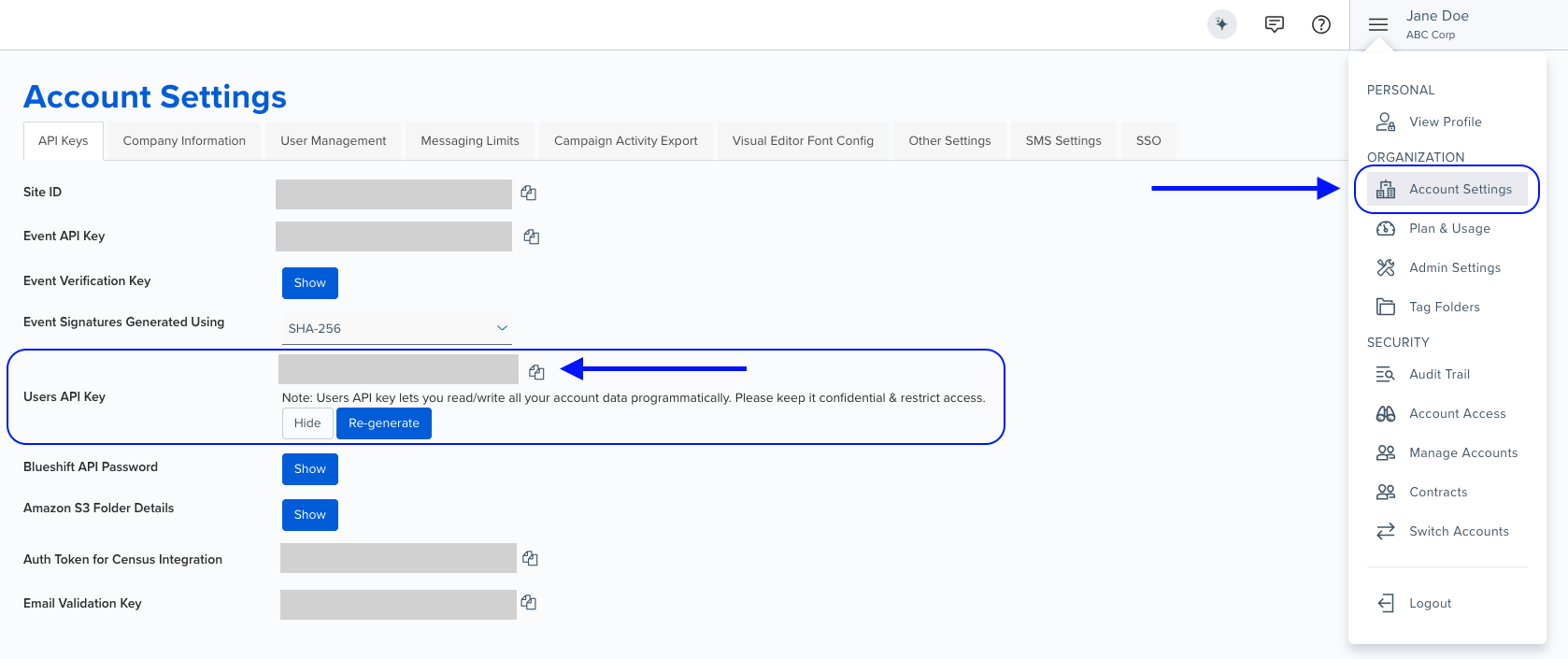
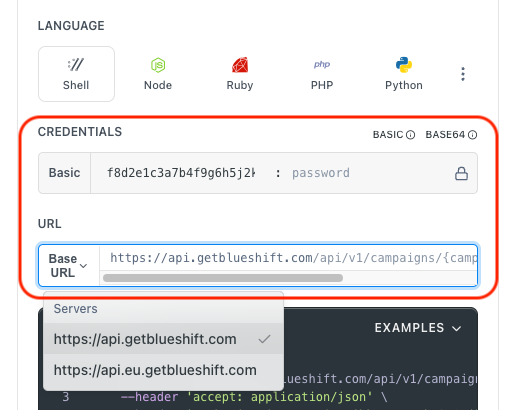
Authentication using Base64 encoding
Note for developers
API requests require authentication using HTTP Basic Authentication with an API key.
The API key serves as the username, while the password field should be left empty.
The format to encode is: your_api_key: (note the trailing colon).
This string must be Base64-encoded and included in the request's Authorization header as follows:
Authorization: Basic encoded_valueYou can generate the encoded value using a trusted Base64 encoder.
Postman collection
Try it with Postman: Explore the API using Blueshift's Postman collection.
Things to know before you start
- Required fields:
name,resource(withsubjectandcontent),skip_user_on_external_fetch_error, andtemplate_propertiesare required. - HTML content: The
contentfield should contain the complete HTML body of the email template. - Recommendation schemes: Use
account_algorithm_uuidto add recommendation schemes. Sendnullto remove existing schemes. - External fetches: Add external fetch UUIDs to integrate external data sources into the template.
- Transaction mixins: Multiple transaction mixins use OR logic - results include transactions matching ANY of the criteria.
- Tag data: Tags must already exist in your account. Format:
folder_name:tag1,tag2,tag3. - Use case: Best for programmatically creating email templates, automating template setup, and bulk template creation.
Request parameters
Check out the request parameters
Body parameters
| Parameter | Type | Required | Description |
|---|---|---|---|
name | string | ✅ Yes | Specify the name for the template. |
resource | object | ✅ Yes | Template content object. See structure below. |
skip_user_on_external_fetch_error | boolean | ✅ Yes | Message is not sent to user if external fetch encounters an error or returns no data. Default: true. |
template_properties | array | ✅ Yes | Campaign behavior properties (max 1 item). See structure below. |
author | string | ❌ No | Specify the email address of the template's author. |
external_fetches | array | ❌ No | Array of external fetch UUIDs to integrate external data sources. |
transaction_mixins | array | ❌ No | Array of transaction mixin UUIDs. Multiple mixins use OR logic. |
tag_data | string | ❌ No | Folder and tags in format folder_name:tag1,tag2,tag3. Tags must exist in your account. |
Resource object
| Parameter | Type | Required | Description |
|---|---|---|---|
subject | string | ✅ Yes | Specify the subject line of the template. |
content | string | ✅ Yes | Specify the HTML body of the template. |
preheader | string | ❌ No | Specify the preheader line of the template. |
Template properties object
| Parameter | Type | Required | Description |
|---|---|---|---|
skip_user_on_blank_products | boolean | ✅ Yes | Skip user if products are blank. Default: true. |
skip_user_on_blank_event_products | boolean | ✅ Yes | Skip user if event products are blank. Default: true. |
account_algorithm_uuid | string | ❌ No | Recommendation scheme UUID. Leave blank for no change, send null to remove existing scheme. |
Example requests & responses
Create a basic email template
Request
curl --request POST \
     --url https://api.getblueshift.com/api/v1/email_templates.json \
     --header 'accept: application/json' \
     --header 'authorization: Basic <YOUR_API_KEY>' \
     --header 'content-type: application/json' \
     --data '{
       "name": "My API Template",
       "author": "[email protected]",
       "resource": {
         "subject": "Hey, {{user.firstname}}!",
         "preheader": "Here are few deals you don'\''t want to miss!",
         "content": "<!DOCTYPE html>\n<html>\n<body>\nHello\n</body></html>"
       },
       "skip_user_on_external_fetch_error": true,
       "template_properties": [
         {
           "skip_user_on_blank_products": true,
           "skip_user_on_blank_event_products": true,
           "account_algorithm_uuid": "2879b1a3-ee84-4e13-b63c-ad83674c0ca1"
         }
       ],
       "external_fetches": [
         {
           "uuid": "e789705f-3eb3-4e2a-a666-648dedae6g86"
         }
       ],
       "tag_data": "Regions:USA,China,Brazil,Hong Kong,India,Sweden,Canada"
     }'
Response
{
  "status": "OK",
  "uuid": "94d45bc8-3488-2002-cd9b-d6314445c545"
}OK