
Use this endpoint to download the first 10 success and errored events in last 5 minutes.
API at a glance
Description: This API downloads the first 10 success and errored events from the last 5 minutes. It helps debug event export integrations by showing recent successful and failed event batches.
Authentication & testing
Testing the API on this page
How to try it here
- Use your User API Key as the Username (leave Password blank).
- Select the appropriate API endpoint based on your Blueshift region.
- Enter the necessary parameters and click Try It to run the request.
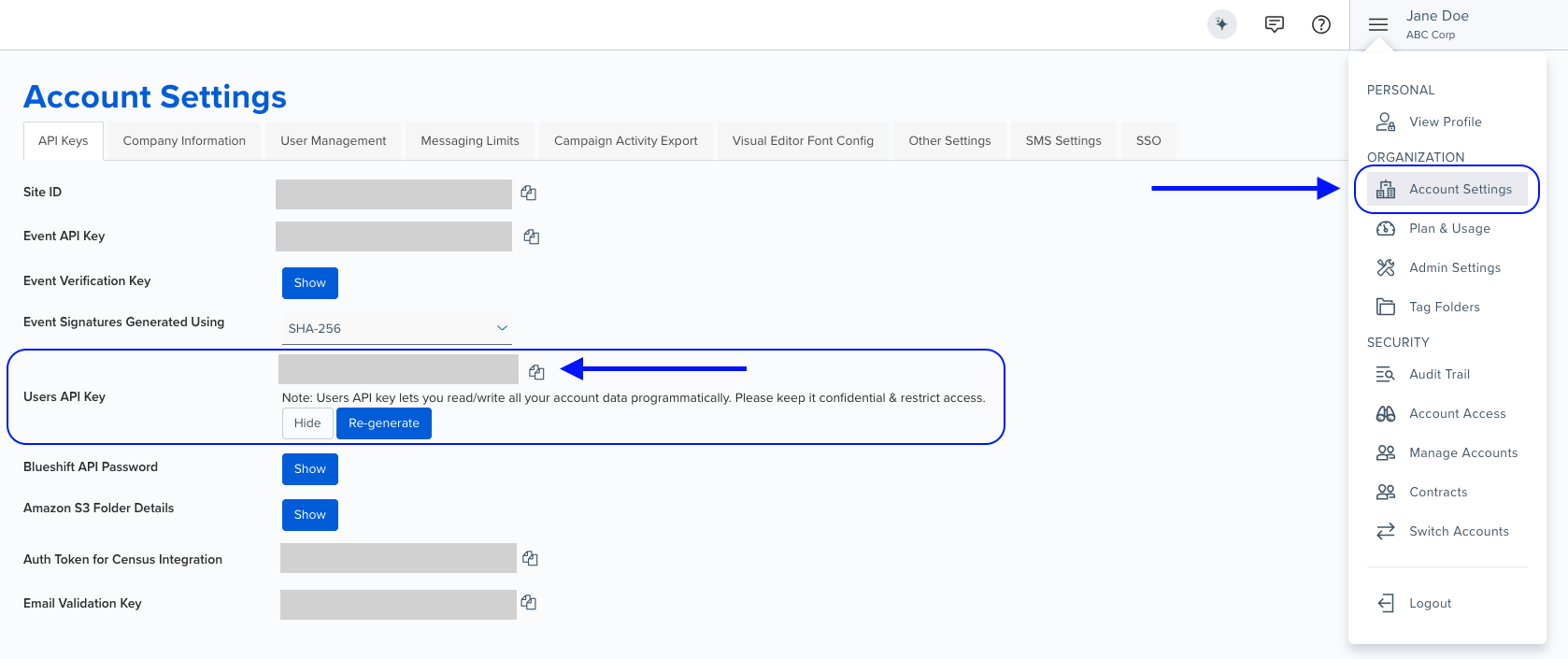
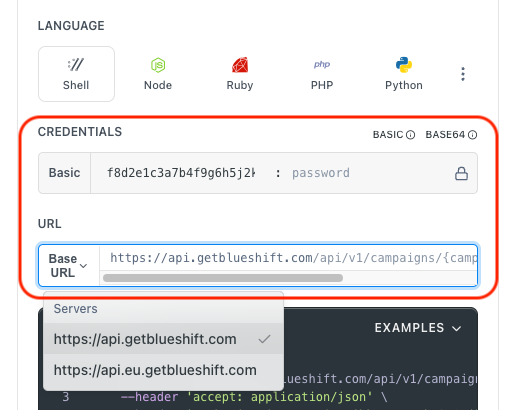
Authentication using Base64 encoding
Note for developers
API requests require authentication using HTTP Basic Authentication with an API key.
The API key serves as the username, while the password field should be left empty.
The format to encode is: your_api_key: (note the trailing colon).
This string must be Base64-encoded and included in the request's Authorization header as follows:
Authorization: Basic encoded_valueYou can generate the encoded value using a trusted Base64 encoder.
Postman collection
Try it with Postman: Explore the API using Blueshift's Postman collection.
Things to know before you start
- Batch processing: Event data for both success and error events are sent in batches at every five-minute interval. Each batch will have a maximum of 5 events.
- Limited history: The API saves only the first five events (in the order they happened) and not all historical events in a batch. If there are no events in that timeframe, then both the success and error arrays would be empty.
- Error storage: Event export errors (if any) are exported to S3 at:
bsft-customers/<site>/events_export/amplitude_de/errors/<year>/<month>/<day> - UI access: In the Blueshift UI, you can view and download logs from the Event exports index page.
- Use case: Best for debugging event export integrations, verifying event payloads sent to destinations, and troubleshooting export errors.
Request parameters
Check out the request parameters
Path parameters
| Parameter | Type | Required | Description |
|---|---|---|---|
data_connector_uuid | string | ✅ Yes | The UUID of the data connector (event export integration). |
Example requests & responses
Get debug event exports
Request
curl --request GET \
     --url https://api.getblueshift.com/api/v1/data_connectors/YOUR_DATA_CONNECTOR_UUID/debug \
     --header 'accept: application/json' \
     --header 'authorization: Basic <YOUR_EVENT_API_KEY>'
Response - Success events
{
  "success": [
    {
      "api_key": "****",
      "events": [
        {
          "event_properties": {
            "_bsft_js_events_export": true,
            "_bsft_js_pipeline": true,
            "_bsft_ts": "2024-05-09T13:15:11.171Z",
            "account_uuid": "5f2e44c3-97e4-4ecf-af72-c84e1a238e21",
            "action": "custom_event",
            "browser_type": "PostmanRuntime",
            "browser_version": "7.37.3",
            "custom_event": "identify1",
            "customer_id": "[email protected]",
            "event-id": "156",
            "session_uuid": "b09812d0-c695-4a7a-a96f-eabae81fa185",
            "site": "bsftfeb23test1.com",
            "timestamp": "2024-05-09T13:15:11.171Z",
            "user_agent": "PostmanRuntime/7.37.3",
            "user_uuid": "b3b29bc2-59eb-43bc-bb88-162076d563f2"
          },
          "event_type": "[Blueshift] identify1",
          "insert_id": "3e439ce5-bbe1-4978-b7cf-4c090f21894d",
          "partner_id": "blueshift",
          "time": 1715260511,
          "user_id": "[email protected]"
        }
      ]
    }
  ]
}
Response - Failure events
{
  "failures": [
    {
      "_bsft_outbound_data_error": "User identifier not found at index - 1",
      "events": [
        {
          "_bsft_js_events_export": true,
          "account_uuid": "5f2e44c3-97e4-4ecf-af72-c84e1a238e21",
          "customer_id": "rt1",
          "email": "[email protected]",
          "event": "add_to_cart",
          "event_uuid": "c71e1188-0df0-11ef-8b5d-0242ac110003",
          "product_ids": ["624860"],
          "product_save_mode": "add_to_timeline",
          "site": "bsftfeb23test1.com",
          "timestamp": "2024-05-09T10:42:05+00:00",
          "user_uuid": "bbbe38a9-41ef-4662-b217-7fb70e1f777e"
        }
      ]
    }
  ]
}
Understanding the response
Success events
The success array contains batches of successfully exported events. Each batch includes:
api_key: Masked API key used in the payloadevents: Array of event payloads successfully sent to the destination
Failure events
The failures array contains batches of failed event exports. Each failure includes:
_bsft_outbound_data_error: Error message explaining why the export failedevents: Array of event payloads that failed to export
Unauthorized - The User API key was incorrect or this feature is not enabled for your account.
Resource not found. This can happen due to resource conflicts. Retry with exponential backoff. If the issue persists, contact Blueshift.