
Use this endpoint to create an empty user list.
API at a glance
Description: This API creates an empty custom user list that can be used as a segment for targeted campaigns. After creation, users can be added to the list via separate API calls.
Authentication & testing
Testing the API on this page
How to try it here
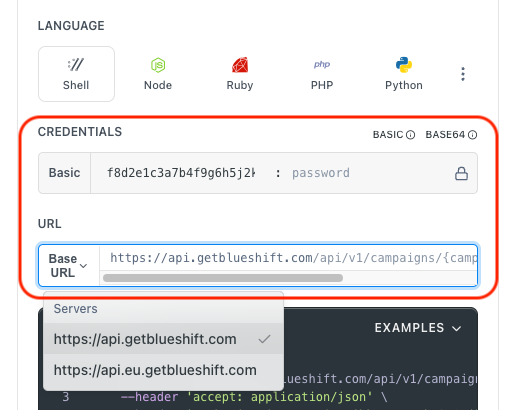
- Use your User API Key as the Username (leave Password blank).
- Select the appropriate API endpoint based on your Blueshift region.
- Enter the necessary parameters and click Try It to run the request.
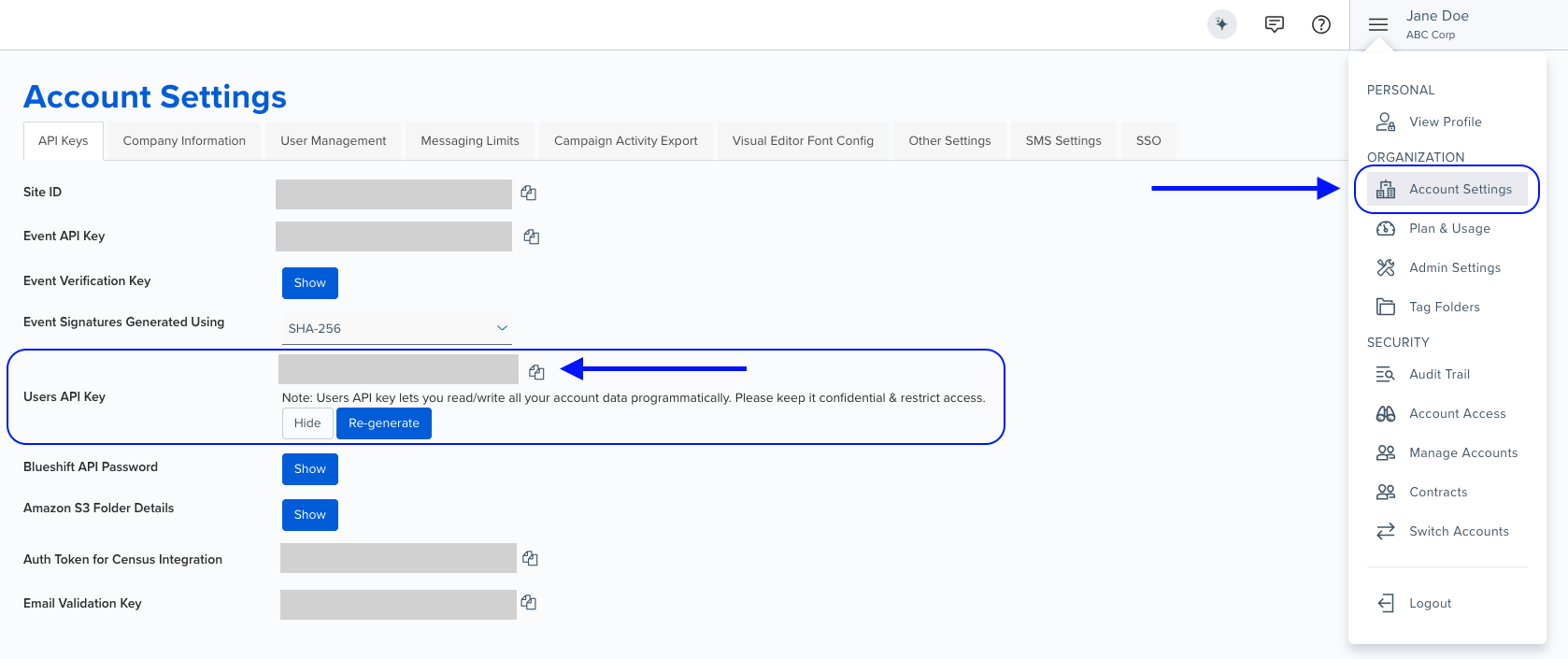
Authentication using Base64 encoding
Note for developers
API requests require authentication using HTTP Basic Authentication with an API key.
The API key serves as the username, while the password field should be left empty.
The format to encode is: your_api_key: (note the trailing colon).
This string must be Base64-encoded and included in the request's Authorization header as follows:
Authorization: Basic encoded_valueYou can generate the encoded value using a trusted Base64 encoder.
Postman collection
Try it with Postman: Explore the API using Blueshift's Postman collection.
Things to know before you start
- Unique name required: The list name must be unique across your account.
- Seed lists: Can be designated as seed lists (internal users who receive test/preview copies of campaigns).
- Source identifier: Specify
emailorcustomer_idas the source for adding users to the list. Defaults toemailif not specified. - Use case: Best for creating targeted audience lists, seed lists for testing, and custom segments for campaigns.
Request parameters
Check out the request parameters
Body parameters
| Parameter | Type | Required | Description |
|---|---|---|---|
name | string | ✅ Yes | Unique name for the list. |
description | string | ✅ Yes | Description providing context about what the list contains. |
is_seed_list | integer | ❌ No | 0 for regular list (default), 1 for seed list (internal users who receive test messages). |
source | string | ❌ No | Source identifier for adding users: email or customer_id. Defaults to email. |
Example requests & responses
Create empty list
{
  "name": "SF user list",
  "description": "The list of users who are based in San Francisco.",
  "is_seed_list": 0,
  "source": "email"
}
{
"id": 48,
"account_id": 15,
"filename": "f4",
"description": "description",
"user_count": 0,
"status": "ready",
"created_at": "2021-08-25T06:06:59.411Z",
"updated_at": "2021-08-25T06:06:59.411Z",
"is_exporting": false,
"user_id": 4981,
"source": "email",
"uuid": "35cb281b-efd6-46b8-8f95-90921e4b1d1f",
"is_seed_list": false,
"deleted_at": null,
"import_method": "api",
"version": "v2",
"author": "John Doe"
}Bad request - The request was invalid or cannot be otherwise served. An accompanying error message will explain further.
Resource not found - Can happen due to resource conflicts. Re-try with exponential backoff. Contact us on [email protected] if the issue persists.
Conflict error, please retry - The request could not be completed due to a conflict with the current state of the target resource, re-try with exponential backoff.
Rate limit exceeded - Too many requests. Contact us on [email protected] for recommended throughput.
Internal Server Error - Please contact blueshift for more information.
Service unavailable, please retry - Bad Gateway, re-try with exponential backoff.
Service unavailable, please retry - Service Unavailable, re-try with exponential backoff.
Service unavailable, please retry - Gateway Timeout, please re-try with exponential backoff.