
post
https://api.getblueshift.com/api/v1/external_fetches.json
Use this endpoint to create an external fetch template.
API at a glance
Description: Create a new external fetch template to retrieve data from external APIs or services. Templates can use dynamic Liquid variables and support both GET and POST methods with authentication.
Authentication & testing
Testing the API on this page
How to try it here
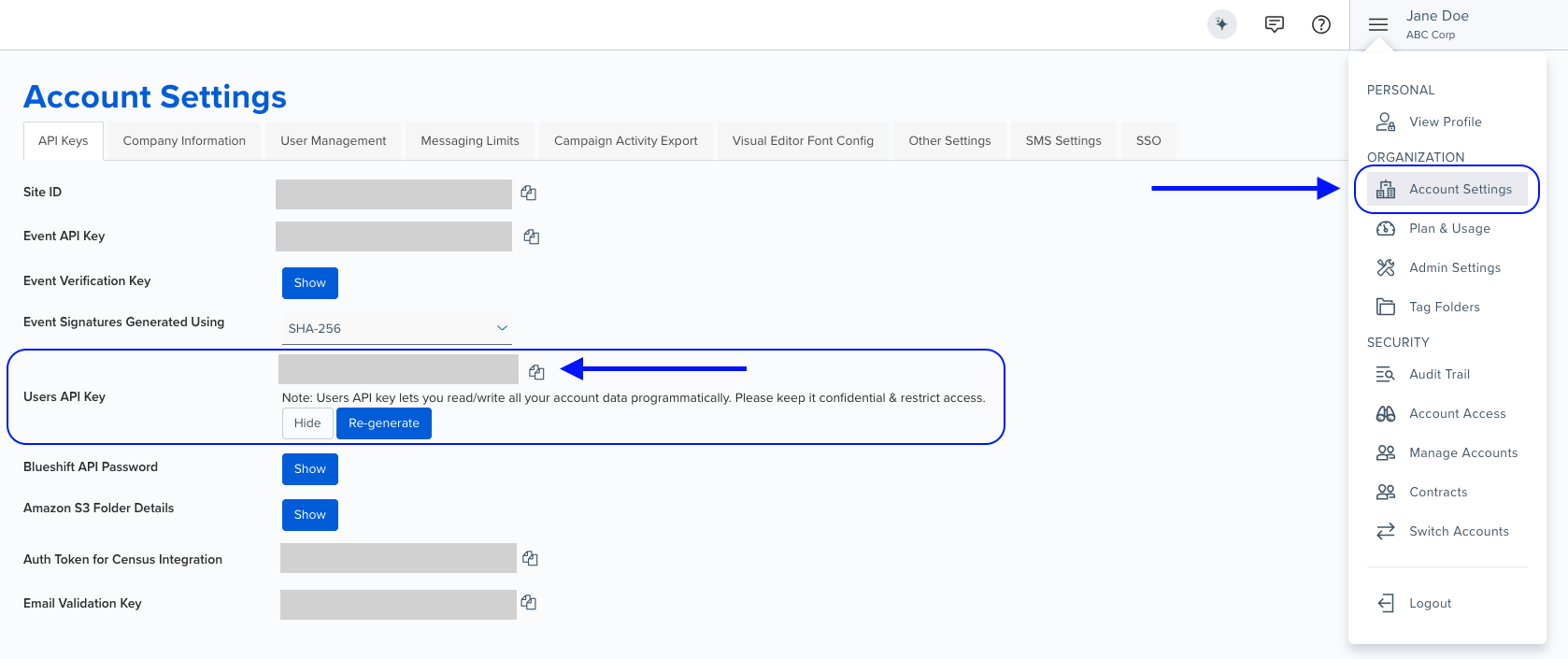
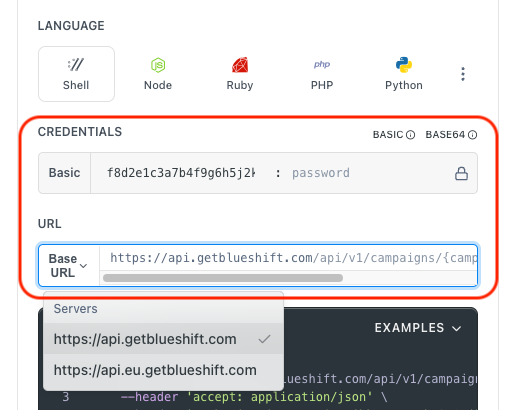
- Use your User API Key as the Username (leave Password blank).
- Select the appropriate API endpoint based on your Blueshift region.
- Enter the necessary parameters and click Try It to run the request.
Authentication using Base64 encoding
Note for developers
API requests require authentication using HTTP Basic Authentication with an API key.
The API key serves as the username, while the password field should be left empty.
The format to encode is: your_api_key: (note the trailing colon).
This string must be Base64-encoded and included in the request's Authorization header as follows:
Authorization: Basic encoded_valueYou can generate the encoded value using a trusted Base64 encoder.
Postman collection
Try it with Postman: Explore the API using Blueshift's Postman collection.
Things to know before you start
- Alias name format: Must contain only lowercase alphanumeric characters and underscores (e.g.,
fetch_weekly_promotions). - HTTP methods: Supports GET and POST. Use POST when you need to send a request body.
- Dynamic variables: URLs can include Liquid variables for user data (e.g.,
{{user_id}},{{email}}). - Authentication: Use
auth_headerandauth_tokentogether for secure API endpoints. - Request body: Only applicable when
http_methodisPOST. Must be valid JSON.
Request parameters
Check out the request parameters
Body parameters
| Parameter | Type | Required | Description |
|---|---|---|---|
alias_name | string | ✅ Yes | Template name (lowercase alphanumeric and underscores only). Example: fetch_weekly_promotions |
http_method | string | ✅ Yes | HTTP method: GET or POST |
url | string | ✅ Yes | External API URL. Can include Liquid variables. Example: https://api.example.com/data |
author | string | No | Email address of the template author. Example: [email protected] |
auth_header | string | No | Authentication header name (use with auth_token for secure URLs) |
auth_token | string | No | Authentication token value (use with auth_header for secure URLs) |
body | string | No | JSON payload for POST requests. Example: {"user_id": 4981} |
test_context | string | No | Test context description. Example: "This is a test fetch to update user profile (user: 4981)" |
Example requests & responses
Create GET template with authentication
POST /api/v1/external_fetches.json{
"alias_name": "fetch_user_recommendations",
"author": "[email protected]",
"http_method": "GET",
"url": "https://api.example.com/recommendations?user_id={{user.customer_id}}",
"auth_header": "Authorization",
"auth_token": "Bearer your_api_token_here",
"test_context": "Fetch personalized product recommendations for user"
}{
"success": true
}Create POST template with body
POST /api/v1/external_fetches.json{
"alias_name": "update_user_profile",
"author": "[email protected]",
"http_method": "POST",
"url": "https://api.example.com/users/update",
"body": "{\"user_id\": {{user.customer_id}}, \"email\": \"{{user.email}}\", \"preferences\": {\"language\": \"en_US\", \"newsletter_subscription\": true}}",
"auth_header": "X-API-Key",
"auth_token": "your_api_key_here",
"test_context": "Update user profile with latest preferences"
}{
"success": true
}Create simple GET template (no auth)
POST /api/v1/external_fetches.json{
"alias_name": "fetch_weekly_promotions",
"http_method": "GET",
"url": "https://api.example.com/promotions/weekly"
}{
"success": true
}OK