
Retrieve a list of shared assets: HTML, rich text, subject lines, and visual editor content.
API at a glance
Description: This API retrieves a list of shared assets including HTML, rich text, subject lines, and visual editor content. Supports filtering by asset type, display name, archived status, and pagination.
For more information about shared assets, see Shared assets overview.
Authentication & testing
Testing the API on this page
How to try it here
- Use your User API Key as the Username (leave Password blank).
- Select the appropriate API endpoint based on your Blueshift region.
- Enter the necessary parameters and click Try It to run the request.
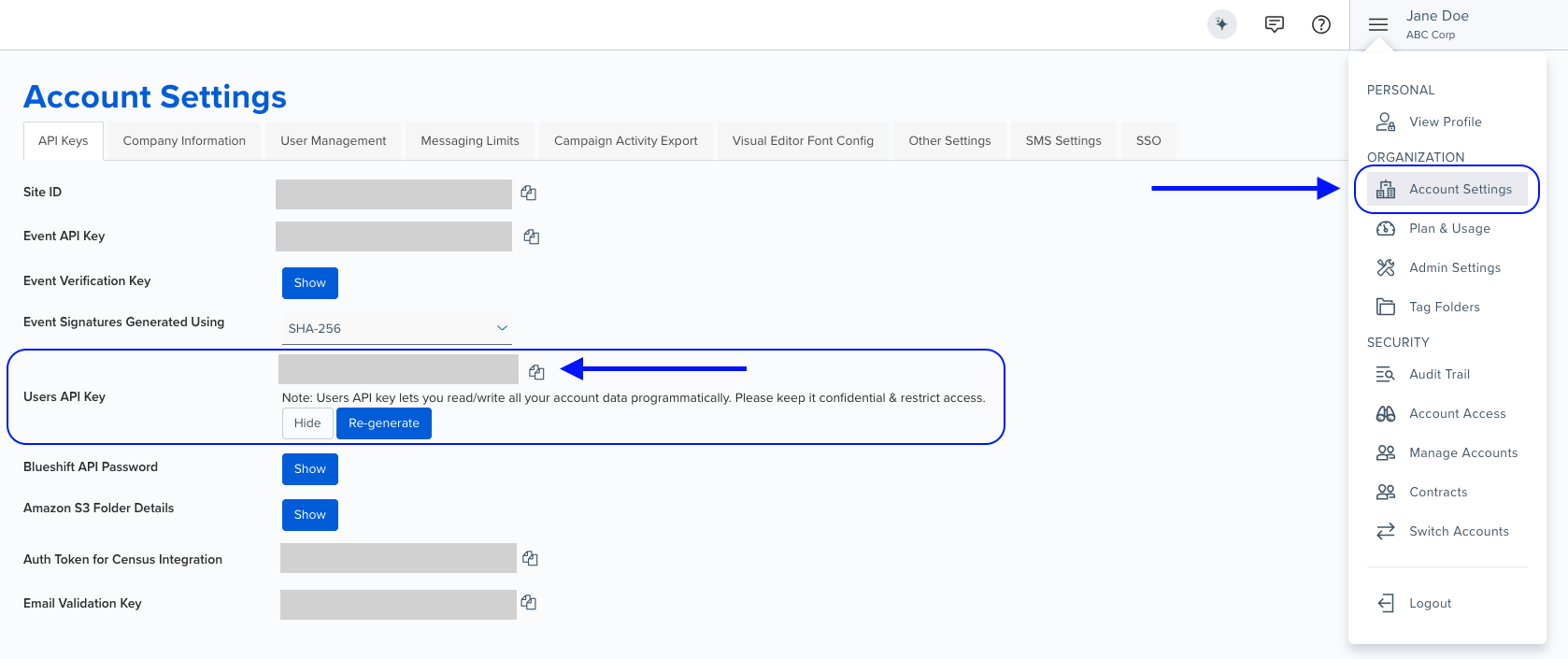
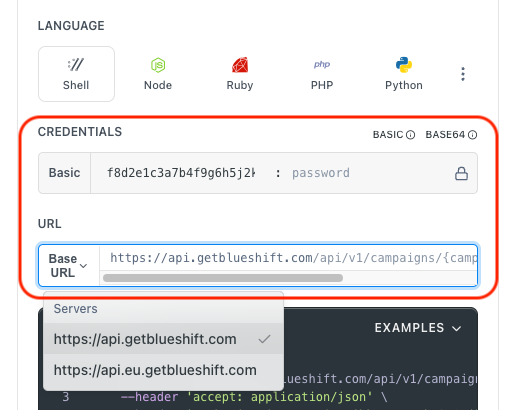
Authentication using Base64 encoding
Note for developers
API requests require authentication using HTTP Basic Authentication with an API key.
The API key serves as the username, while the password field should be left empty.
The format to encode is: your_api_key: (note the trailing colon).
This string must be Base64-encoded and included in the request's Authorization header as follows:
Authorization: Basic encoded_valueYou can generate the encoded value using a trusted Base64 encoder.
Postman collection
Try it with Postman: Explore the API using Blueshift's Postman collection.
Things to know before you start
- Default behavior: Without query parameters, retrieves all shared assets (active and archived) across all types.
- Asset types:
html,rich_text,visual_editor,subject - Archived filter: Use
0for active,1for archived, omit for both. Response returns boolean. - Pagination: Zero-based index.
page=0&per_page=25returns first 25 results. - Multiple asset types: Repeat
asset_type[]parameter for multiple values. - Use case: Best for managing reusable content blocks, auditing shared assets, and integrating with external systems.
Request parameters
Check out the request parameters
Query parameters
Note: All query parameters are optional.
| Parameter | Type | Required | Description |
|---|---|---|---|
asset_type[] | array | ❌ No | Filter by asset types. Repeat for multiple values. Values: html, rich_text, visual_editor, subject. |
display_name | string | ❌ No | Returns assets whose display name contains the specified substring. |
archived | integer | ❌ No | Archived status. 0 for active, 1 for archived, omit for both. Response returns as boolean. |
page | integer | ❌ No | Page number (zero-based index). Example: page=0 for first page. |
per_page | integer | ❌ No | Number of results per page. |
Example requests & responses
Get active HTML and Visual Editor assets
GET /api/v1/shared_assets.json?asset_type[]=html&asset_type[]=visual_editor&archived=0&per_page=2&page=0[
{
"uuid": "a1b2c3d4-e5f6-7890-abcd-1234567890ef",
"asset_type": "html",
"shareable_name": "footer_block",
"display_name": "Footer Block",
"archived": false,
"author": "Content Team",
"email": "[email protected]",
"templates": [],
"template_count": 0,
"updated_at": "2025-08-28T12:00:00.000Z",
"content": "<table><tr><td>Footer HTML content</td></tr></table>",
"locked_parents": [],
"lockable_children": []
},
{
"uuid": "b2c3d4e5-f6a7-8901-bcde-2345678901fg",
"asset_type": "visual_editor",
"shareable_name": "promo_banner",
"display_name": "Promo Banner",
"archived": false,
"author": "Design Team",
"email": "[email protected]",
"templates": [],
"template_count": 0,
"updated_at": "2025-08-28T15:30:00.000Z",
"content": "<div style=\"text-align:center\">Big Sale</div>",
"locked_parents": [],
"lockable_children": []
}
]Get subject assets by display name
GET /api/v1/shared_assets.json?asset_type[]=subject&display_name=Welcome&per_page=2&page=0[
{
"uuid": "c3d4e5f6-a7b8-9012-cdef-3456789012gh",
"asset_type": "subject",
"shareable_name": "welcome_subject_v2",
"display_name": "Welcome Subject v2",
"archived": false,
"author": "Copy Team",
"email": "[email protected]",
"templates": [],
"template_count": 0,
"updated_at": "2025-08-29T09:45:00.000Z",
"content": "Welcome aboard! Here's your quick start.",
"locked_parents": [],
"lockable_children": []
},
{
"uuid": "d4e5f6a7-b8c9-0123-def4-4567890123hi",
"asset_type": "subject",
"shareable_name": "welcome_subject_offer",
"display_name": "Welcome Subject – Special Offer",
"archived": false,
"author": "Copy Team",
"email": "[email protected]",
"templates": [],
"template_count": 0,
"updated_at": "2025-08-29T08:20:00.000Z",
"content": "Thanks for joining! Enjoy 15% off your first purchase.",
"locked_parents": [],
"lockable_children": []
}
]Bad request - The request was invalid or cannot be otherwise served.
Resource not found - Can happen due to resource conflicts. Re-try with exponential backoff.
Conflict error, please retry - The request could not be completed due to a conflict with the current state of the target resource, re-try with exponential backoff.
Payload too large - The server is refusing to process a request because the request payload is larger than the server is willing or able to process.
Rate limit exceeded - Too many requests.
Internal Server Error - Please contact Blueshift for more information.
Service unavailable, please retry - Bad Gateway, re-try with exponential backoff.
Service unavailable, please retry - Service Unavailable, re-try with exponential backoff.
Service unavailable, please retry - Gateway Timeout, please re-try with exponential backoff.