
Use this endpoint to trigger multiple campaigns.
API at a glance
Description: This API allows you to trigger campaigns in bulk. You can trigger the same campaign for multiple users or different campaigns for different users in a single API call.
NoteThe endpoint works for campaigns that are set to trigger using an API call.
Authentication & testing
Testing the API on this page
How to try it here
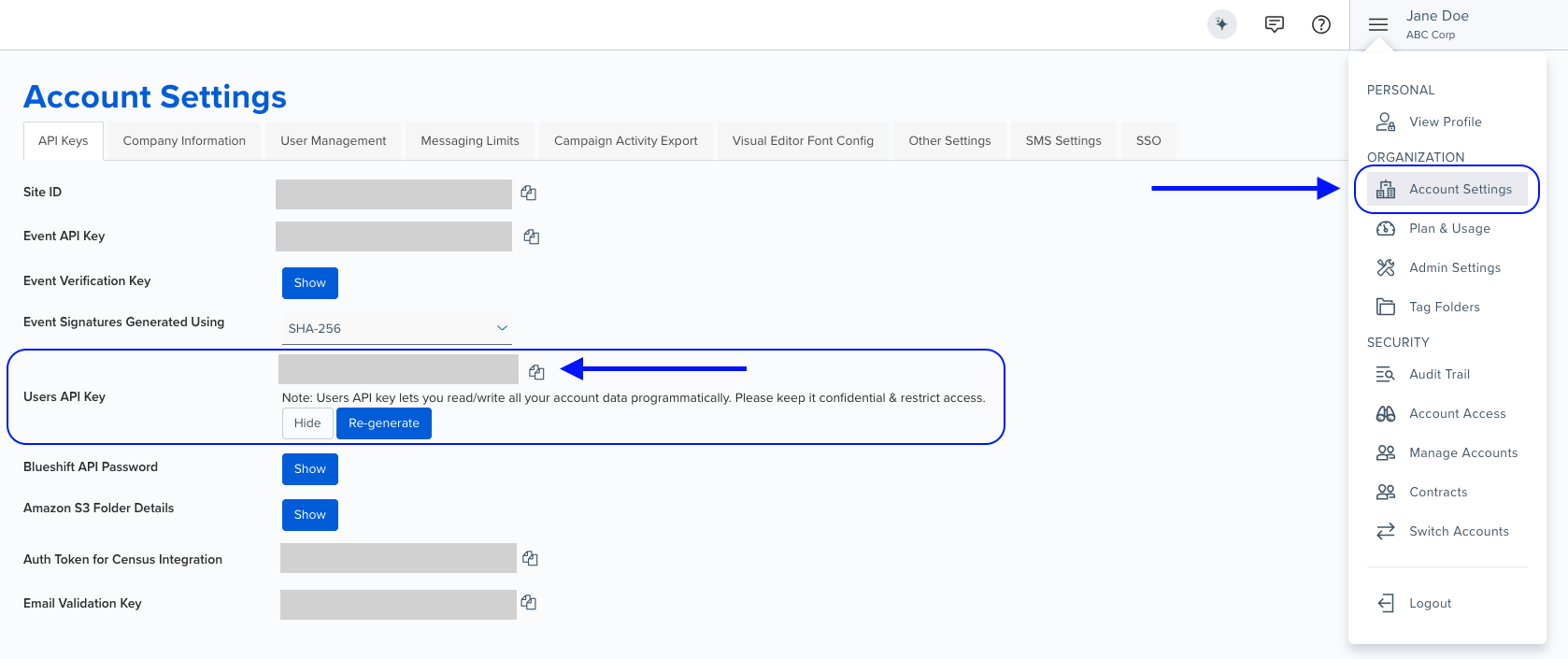
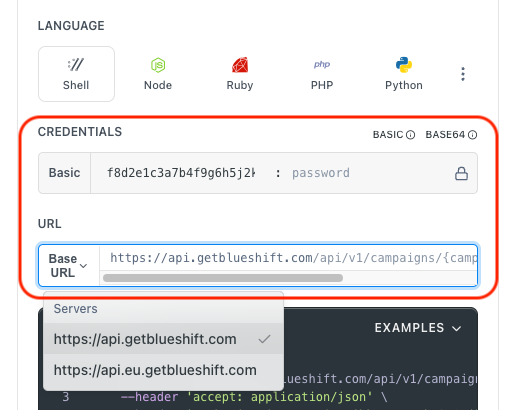
- Use your User API Key as the Username (leave Password blank).
- Select the appropriate API endpoint based on your Blueshift region.
- Enter the necessary parameters and click Try It to run the request.
Authentication using Base64 encoding
Note for developers
API requests require authentication using HTTP Basic Authentication with an API key.
The API key serves as the username, while the password field should be left empty.
The format to encode is: your_api_key: (note the trailing colon).
This string must be Base64-encoded and included in the request's Authorization header as follows:
Authorization: Basic encoded_valueYou can generate the encoded value using a trusted Base64 encoder.
Postman collection
Try it with Postman: Explore the API using Blueshift's Postman collection.
Things to know before you start
- Batch processing: This API is designed for high-volume campaign triggers.
- Idempotency: Use the
transaction_uuidfield to prevent duplicate messages. If a request with the sametransaction_uuidis received, the system returns a 200 status code along with a message noting the request was already processed. - Priority processing: Set
_bsft_high_prioritytotruefor time-sensitive campaigns. Blueshift processes all high-priority campaigns first (FIFO), followed by standard campaigns (FIFO). - Email attachments: You can include file attachments by providing URLs in the
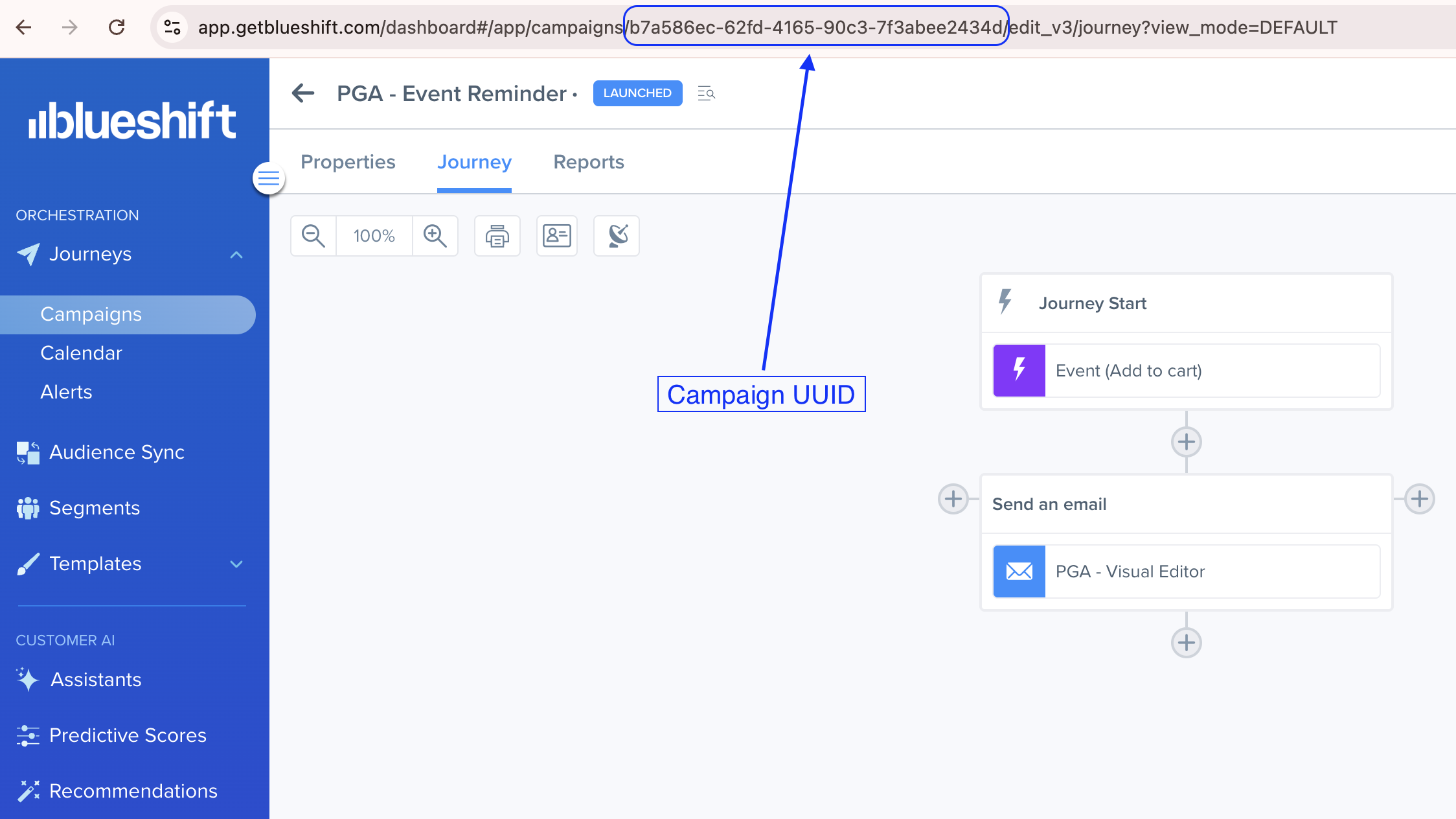
email_attachmentsarray. - Campaign UUID: You can copy the campaign UUID from the URL of the campaign on the Blueshift app. For example, if you open a campaign in the Blueshift app, its URL looks like
https://app.getblueshift.com/dashboard#/app/campaigns/<CAMPAIGN_UUID>/details. - Use case: Best for batch processing transactional emails, daily digests, or system alerts where multiple campaign triggers need to be sent at once.
Finding the campaign UUIDThe campaign UUID is visible in the browser's address bar when you open a campaign. For example:
https://app.getblueshift.com/dashboard#/app/campaigns/<CAMPAIGN_UUID>/edit_v3/journey
Request parameters
Check out the request parameters
Body parameters
| Parameter | Type | Required | Description |
|---|---|---|---|
payloads | array | ✅ Yes | An array of objects, where each object contains the details for a specific campaign trigger. |
Payloads object
Note: These parameters apply to each object inside the
payloadsarray.
Parameter | Type | Required | Description |
|---|---|---|---|
|
| ✅ Yes | The email address of the user for whom you want to trigger the campaign. |
|
| ✅ Yes | The UUID of the campaign to be triggered. |
|
| ❌ No | A unique UUID (must be well-formed UUID v4) to prevent duplicate messages. The API returns a 200 status code for duplicate requests along with a message noting the request was already processed. |
|
| ❌ No | Set to
|
|
| ❌ No | An array of file URLs to send as attachments with the email.
|
Example requests & responses
Bulk trigger multiple campaigns
Request
{
  "payloads": [
    {
      "email": "[email protected]",
      "campaign_uuid": "857ad5a5-1cd1-4c8a-bd9b-b2cdbb6595cc",
      "email_attachments": [
        "https://cdn.getblueshift.com/examples/sample.pdf"
      ],
      "_bsft_high_priority": true
    },
    {
      "email": "[email protected]",
      "campaign_uuid": "a0d1a0f3-6596-4e1c-b487-3639e05b6d2f",
      "transaction_uuid": "123e4567-e89b-12d3-a456-426614174000"
    }
  ]
}
Response
[
  {
    "success": true
  },
  {
    "success": true
  }
]