
Deletes a customer group. Set delete_users to keep or remove the associated users.
API at a glance
Customer groups is a premium feature.Please contact your CSM to enable customer groups for your account. For more details, see the Customer groups Help Center article.
Description: Deletes a customer group. Use delete_users to keep or remove the associated users.
Authentication & testing
Testing the API on this page
How to try it here
- Use your User API Key as the Username (leave Password blank).
- Select the appropriate API endpoint based on your Blueshift region.
- Enter the necessary parameters and click Try It to run the request.
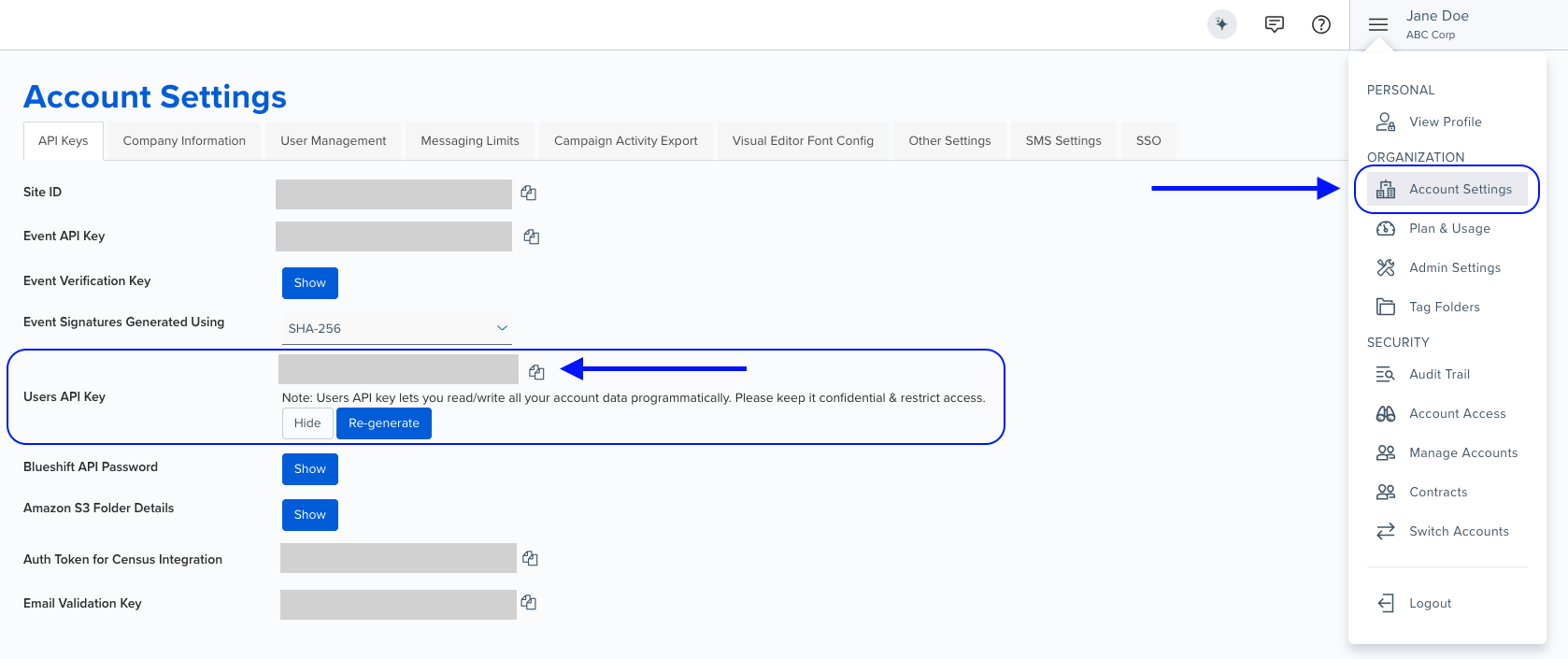
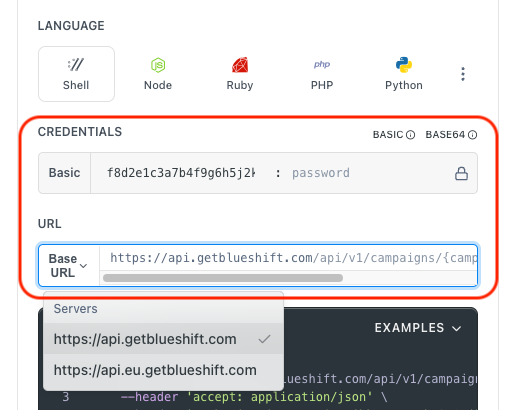
Authentication using Base64 encoding
Note for developers
API requests require authentication using HTTP Basic Authentication with an API key.
The API key serves as the username, while the password field should be left empty.
The format to encode is: your_api_key: (note the trailing colon).
This string must be Base64-encoded and included in the request's Authorization header as follows:
Authorization: Basic encoded_valueYou can generate the encoded value using a trusted Base64 encoder.
Postman collection
Try it with Postman: Explore the API using Blueshift's Postman collection.
Things to know before you start
- You can find the
group IDon the group's profile page in Blueshift.
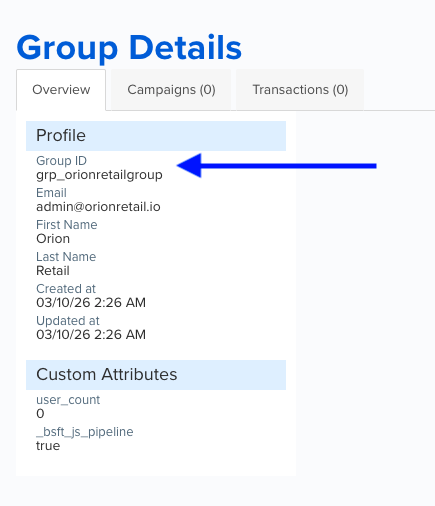
- Set
delete_users=falseto preserve all user records after deleting the group. If omitted, users are also deleted. - This operation is irreversible. Deleted groups and users cannot be recovered.
- Group events associated with the deleted group will no longer be accessible from any customer profile.
Request parameters
Check out the request parameters
Path parameters
| Parameter | Type | Required | Description |
|---|---|---|---|
group_id | string | ✅ Yes | The ID of the customer group to delete. |
Query parameters
| Parameter | Type | Required | Description |
|---|---|---|---|
delete_users | boolean | ❌ No | Determines whether the users in the group are also deleted. - false — Preserves all associated user records. - true or omitted — Deletes associated users permanently. Default: false. |
Delete a group and preserve users (delete_users=false)
curl --request DELETE \
     --url 'https://api.getblueshift.com/api/v1/customer_group/grp_orionretail?delete_users=false' \
     --header 'accept: application/json' \
     --header 'authorization: Basic YOUR_ENCODED_USER_API_KEY'
{
"group": {
"account_uuid": "6352c279-69a2-4222-b988-b01a729a6d2c",
"created_at": "2026-03-10T07:46:30.713Z",
"extended_attributes": {
"_bsft_js_pipeline": true,
"_bsft_ts": "2026-03-10T07:46:30.656Z",
"email": "[email protected]",
"firstname": "Orion",
"lastname": "Retail",
"timestamp": "2026-03-10T07:46:30.656Z"
},
"group_id": "grp_orionretail",
"updated_at": "2026-03-10T07:54:38.932Z",
"user_count": 4,
"user_uuids": [
"062b6926-89d2-4dfd-945f-be61720b06ce",
"41f446aa-43ca-4718-b45c-c68e575a371f",
"81f19599-6fff-4012-8e0a-77941149b599",
"ae2ded0f-19b6-4d93-b5f9-66acfd579698"
],
"uuid": "479b7071-997c-426e-94a5-387d97897d50",
"version": "1",
"email": "[email protected]",
"firstname": "Orion",
"lastname": "Retail",
"timestamp": "2026-03-10T07:46:30.656Z"
},
"_bsft_delete_status": "success"
}Delete a group and its associated users (delete_users=true)
curl --request DELETE \
     --url 'https://api.getblueshift.com/api/v1/customer_group/grp_veloxmedia?delete_users=true' \
     --header 'accept: application/json' \
     --header 'authorization: Basic YOUR_ENCODED_USER_API_KEY'
{
"group": {
"account_uuid": "6352c279-69a2-4222-b988-b01a729a6d2c",
"created_at": "2026-03-10T07:46:39.531Z",
"extended_attributes": {
"_bsft_js_pipeline": true,
"_bsft_ts": "2026-03-10T07:46:39.445Z",
"email": "[email protected]",
"firstname": "Velox",
"lastname": "Media",
"timestamp": "2026-03-10T07:46:39.445Z"
},
"group_id": "grp_veloxmedia",
"updated_at": "2026-03-10T07:49:07.179Z",
"user_count": 5,
"user_uuids": [
"4fb30f34-154d-49fe-800d-7bfde5806f27",
"82f10575-5474-4fac-a45b-0d0b434e39e6",
"b408e8f6-a011-4c3a-8a16-1d99c4480d61",
"b5a1c08b-d2df-4da0-a63c-01f430d31ec3",
"b5c77c44-f013-4a96-9df4-62e3b109265b"
],
"uuid": "d18225f5-3a74-443f-b21c-931457688281",
"version": "1",
"email": "[email protected]",
"firstname": "Velox",
"lastname": "Media",
"timestamp": "2026-03-10T07:46:39.445Z"
},
"_bsft_delete_status": "success"
}Bad Request - The request is invalid due to missing or incorrect parameters.
Unauthorized - API authentication failed due to an invalid or missing API key.
Forbidden - The API key does not have sufficient permissions to perform this action.
Not Found - The specified group ID was not found. Verify the value and try again.
Too Many Requests - The request limit has been exceeded. Reduce request frequency.
Internal Server Error - An unexpected server error occurred. Contact support if the issue persists.
Bad Gateway - The server received an invalid response. Retry the request.
Service Unavailable - The service is temporarily unavailable. Try again later.
Gateway Timeout - The server took too long to respond. Retry the request with exponential backoff.