
Updates the content of a running Live Activity, or ends it.
Use this endpoint to update the content of a running Live Activity, or to end it.
API at a glance
Description: Updates change the card in place rather than sending a fresh notification each time, so customers see the latest state without a stream of alerts building up. Use the same endpoint to end an activity by setting end_activity to true.
Address the activity with the bsft_activity_id you set as bsftActivityId when calling Start a Live Activity, together with the same activity_attributes_type. Both must match or the activity is not found.
Before you can use this endpoint
App setup
Live Activities must be built into your iOS app and integrated with the Blueshift iOS SDK before this endpoint can deliver anything. Your app defines the layout of the card and the content it accepts. Blueshift sends the content that appears inside it.
For setup instructions, see Set up Live Activities.
Requirements
- Devices running iOS 17.2 or later
- Blueshift iOS SDK 2.8.0 or later
- Token-based (.p8) push authentication configured on your Blueshift push adapter
- An activity already started with Start a Live Activity
Authentication & testing - Live Activities
Testing the API on this page
How to try it here
- Use your Event API Key as the Username (leave Password blank). You can find it in the Blueshift app under Account Settings > API Keys.
- Select the appropriate API endpoint based on your Blueshift region.
- Enter the necessary parameters and click Try It to run the request.
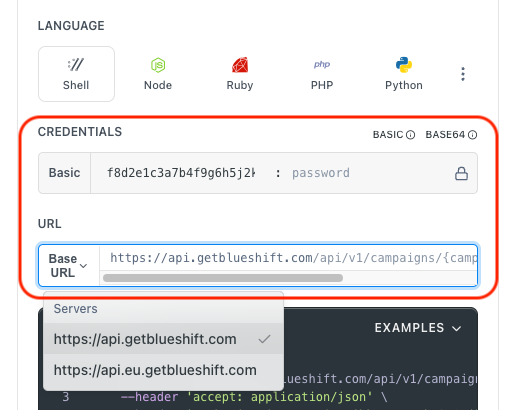
Authentication using Base64 encoding
Note for developers
API requests require authentication using HTTP Basic Authentication with the Event API Key.
The Event API Key serves as the username, while the password field should be left empty.
The format to encode is: your_api_key: (note the trailing colon).
This string must be Base64-encoded and included in the request's Authorization header
as follows:
Authorization: Basic encoded\_value
You can generate the encoded value using a trusted Base64 encoder.
Postman collection
Try it with Postman: Explore the API using Blueshift's Postman collection.
Things to know before you start
bsft_activity_idandactivity_attributes_typemust both match the values used to start the activity. If either differs, the activity is not found and nothing is delivered.- Retry an update that returns
Running Live Activity not found for any device. The device registers the activity with Blueshift shortly after it starts. An update sent before that completes returns this message. It is not a permanent failure. content_stateproperty names must match your app. They must exactly match theContentStateyour app defines. A mismatch is not reported as an error: the API returns a success response and the device discards the content.- Omit
notificationto update silently. Include it only when a change is significant enough to alert the customer. - Set
end_activitytotrueto end the activity. It is removed from the Dynamic Island immediately and clears from the Lock Screen shortly after. - Activities can be updated for up to 8 hours after they start. This is an Apple limit. For events that run longer, end the activity and start a new one for each stage.
- A
200response means the push was dispatched, not displayed. Checkdispatched_toand theerrorsarray in the response. - Set
dismissal_dateto control when an ended activity clears. By default an ended Live Activity stays on the Lock Screen for up to four hours. Senddismissal_datealongsideend_activityto remove it sooner. A timestamp in the past clears it immediately. - Choose the right priority. Apple limits how many Live Activity updates you can send per hour. Priority
10arrives immediately but counts toward that limit — go over it and Apple may start throttling your updates. Priority5doesn't count toward the limit, but Apple decides when to deliver it. Use5for routine updates and10when timing matters. See Apple's guidance on update frequency.
Request parameters
Check out the request parameters
Body parameters
| Parameter | Type | Required | Description |
|---|---|---|---|
customer_identifier_type | string | ✅ Yes | Type of identifier used in customer_identifiers. One of customer_id, email, or phone_number. |
customer_identifiers | string[] | ✅ Yes | Identifier values. Maximum 50 per call. |
activity_attributes_type | string | ✅ Yes | Name of the activity design. Must match the value used when starting the activity. |
bsft_activity_id | string | ✅ Yes | The identifier you set as bsftActivityId when starting the activity. |
content_state | object | ✅ Yes | Updated dynamic content. Property names must match the ContentState defined in your app. |
notification | object | ❌ No | Alert shown with the update. Accepts title and body. Omit it to update the activity silently. |
end_activity | boolean | ❌ No | Set to true to end the activity. Defaults to false. |
stale_date | string | ❌ No | ISO 8601 timestamp after which the content is considered out of date. |
dismissal_date | string | ❌ No | Applies only when end_activity is true. ISO 8601 timestamp at which the ended activity is removed from the device. Ignored on updates that do not end the activity. If omitted, the system's default dismissal timing applies. |
priority | integer | ❌ No | Push delivery priority. Use 10 to deliver immediately, or 5 for updates that do not need immediate attention. Values above 5 are treated as 10. Defaults to 10. |
Example requests & responses
Update an activity
  curl --request POST \
       --url https://api.getblueshift.com/api/v1/live_activity/update \
       --header 'accept: application/json' \
       --header 'authorization: Basic YWNlZDZlNGYxMWExYWVhOTZmNTJkNDg4M2ZmMjI4Mjg6' \
       --header 'content-type: application/json' \
       --data '
  {
    "customer_identifier_type": "email",
    "customer_identifiers": ["[email protected]"],
    "activity_attributes_type": "DeliveryActivityAttribute",
    "bsft_activity_id": "order_4482",
    "content_state": {
      "title": "Out for delivery",
      "subtitle": "Arriving by 6:45 PM",
      "progress": 0.7
    },
    "priority": 5
  }
  '
{
"status": "ok",
"dispatched_to": 1,
"errors": []
}End an activity
Set end_activity to true. The content_state you send is the final content the customer sees before the card clears.
  curl --request POST \
       --url https://api.getblueshift.com/api/v1/live_activity/update \
       --header 'accept: application/json' \
       --header 'authorization: Basic YWNlZDZlNGYxMWExYWVhOTZmNTJkNDg4M2ZmMjI4Mjg6' \
       --header 'content-type: application/json' \
       --data '
  {
    "customer_identifier_type": "email",
    "customer_identifiers": ["[email protected]"],
    "activity_attributes_type": "DeliveryActivityAttribute",
    "bsft_activity_id": "order_4482",
    "content_state": {
      "title": "Delivered",
      "subtitle": "Enjoy your order",
      "progress": 1.0
    },
    "end_activity": true,
    "dismissal_date": "2026-08-27T19:00:00Z",
    "priority": 10
  }
  '
{
"status": "ok",
"dispatched_to": 1,
"errors": []
}Response when the activity is not found
The request succeeds with a 200 status, but dispatched_to is 0 and the errors array explains why. This happens when the activity has already ended, the customer dismissed it, or the device has not finished registering it.
{
  "status": "ok",
  "dispatched_to": 0,
  "errors": [
    {
      "customer_identifier_type": "email",
      "customer_identifier_value": "[email protected]",
      "error_message": "Running Live Activity not found for any device"
    }
  ]
}
API error responses
| Status code | Description | Example response |
|---|---|---|
| 400 Bad Request | A required parameter is missing or malformed. | { "errors": [{ "detail": "Missing customer_identifier_type" }] } |
| 401 Unauthorized | API authentication failed due to an invalid or missing API key. | { "message": "Not authorized" } |
| 403 Forbidden | The API key does not have sufficient permissions. | { "message": "Forbidden" } |
| 404 Not Found | None of the supplied identifiers resolved to a customer. | { "errors": [{ "detail": "No identifiers resolved" }] } |
| 413 Payload Too Large | More than 50 customer identifiers were supplied. | { "errors": [{ "detail": "You can add maximum 50 customer identifiers in one API call" }] } |
| 422 Unprocessable Entity | The account has no push adapter configured. | { "errors": [{ "detail": "No push adapter configured" }] } |
| 429 Too Many Requests | The request limit has been exceeded. | { "message": "Rate limit exceeded" } |
| 500 Internal Server Error | An unexpected server error occurred. | { "errors": [{ "detail": "Delivery failed" }] } |
| 502 Bad Gateway | The server received an invalid response. Retry with exponential backoff. | { "message": "Bad Gateway" } |
| 503 Service Unavailable | The service is temporarily unavailable. Retry with exponential backoff. | { "message": "Service Unavailable" } |
| 504 Gateway Timeout | The server took too long to respond. Retry with exponential backoff. | { "message": "Gateway Timeout" } |
Field reference
Response fields
| Field | Type | Description |
|---|---|---|
status | string | Result of the request. Returns ok when the request was accepted. |
dispatched_to | integer | Number of devices the message was dispatched to. A value of 0 means no device received it; check the errors array. |
errors | array | Per-identifier errors. Empty when every identifier resolved to a device. |
errors[].customer_identifier_type | string | The identifier type supplied in the request. |
errors[].customer_identifier_value | string | The identifier value that could not be reached. |
errors[].error_message | string | Why the identifier could not be reached. |
Error messages in the errors array
| Message | Description |
|---|---|
Running Live Activity not found for any device | No running activity matches this bsft_activity_id and activity_attributes_type. The activity may have ended, been dismissed by the customer, or not yet finished registering. |
No user found for given identifier | No customer matches the identifier supplied. |
Rate limit exceeded - Too many requests
Service unavailable, please retry - Bad Gateway, re-try with exponential backoff
Service unavailable, please retry - Service Unavailable, re-try with exponential backoff
Service unavailable, please retry - Gateway Timeout, please re-try with exponential backoff