
Use this endpoint to retrieve the full attribute schema tracked for an entity in your account, including standard and custom attributes.
API at a glance
Description: This API returns the complete attribute schema that Blueshift tracks for an entity in your account — users, events, or products — including standard Blueshift attributes and any custom attributes you have added.
Authentication & testing
Testing the API on this page
How to try it here
- Use your User API Key as the Username (leave Password blank).
- Select the appropriate API endpoint based on your Blueshift region.
- Enter the necessary parameters and click Try It to run the request.
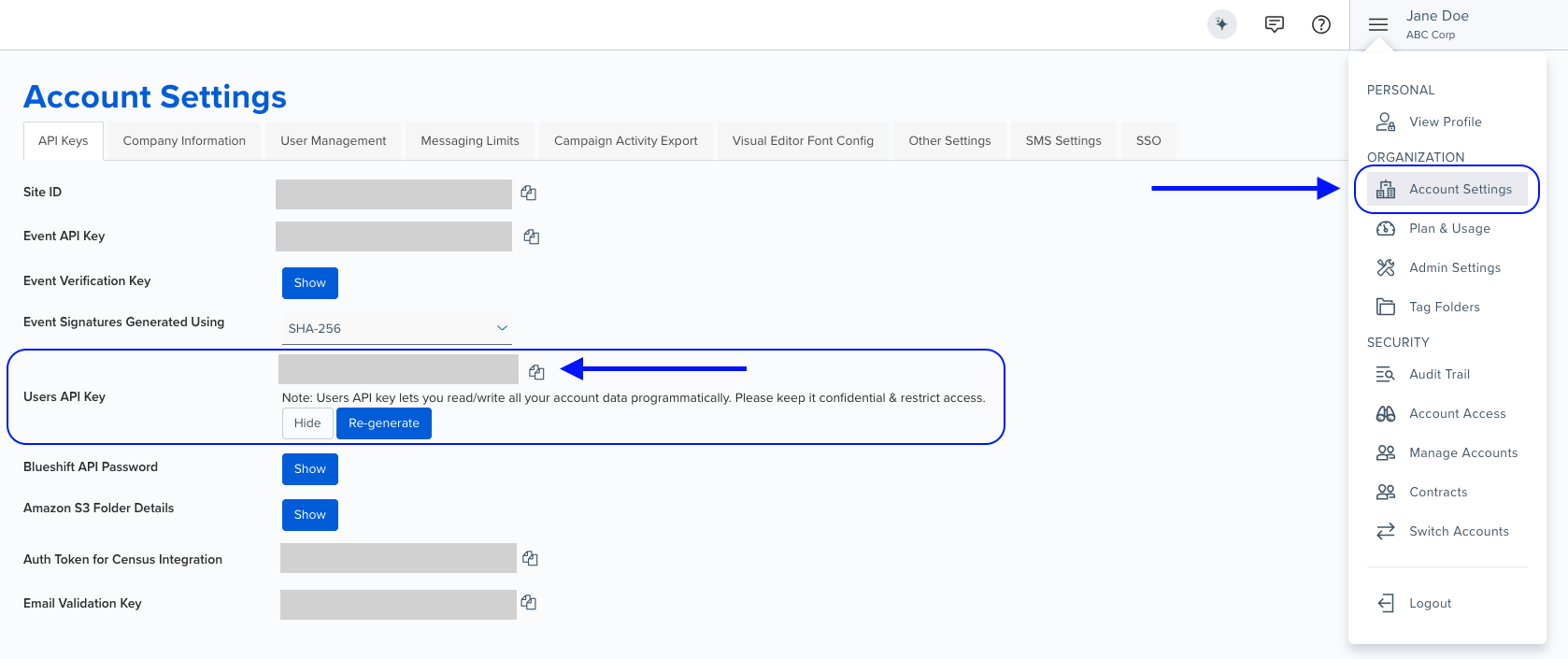
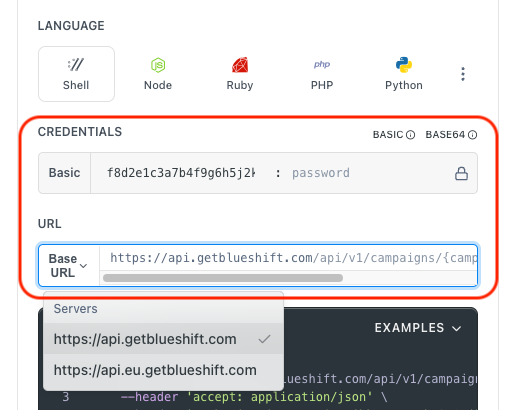
Authentication using Base64 encoding
Note for developers
API requests require authentication using HTTP Basic Authentication with an API key.
The API key serves as the username, while the password field should be left empty.
The format to encode is: your_api_key: (note the trailing colon).
This string must be Base64-encoded and included in the request's Authorization header as follows:
Authorization: Basic encoded_valueYou can generate the encoded value using a trusted Base64 encoder.
Postman collection
Try it with Postman: Explore the API using Blueshift's Postman collection.
Things to know before you start
- One entity per call: Use
entity_nameto choose betweenusers,events, andproducts. If you leave it blank, the API returns the users schema. - Response structure: The response is a JSON object keyed by attribute name. Each value describes that attribute's type, category, and metadata.
- Grouped attributes nest their fields: Attributes such as
custom_attributeson users andextended_attributeson products list their sub-attributes underchildrenrather than at the top level. Walk intochildrenas well as the top-level keys when you enumerate or count attributes. associated_eventsis events only: It lists the event types that include the attribute, and does not appear for users or products.- Cache the response: Attribute schemas change infrequently. Refresh periodically — daily, for example — rather than calling this endpoint on every request.
- Use case: Best for building a data dictionary programmatically, keeping a BI tool or data catalog in sync with Blueshift, and confirming that a custom attribute or event field was captured correctly.
Request parameters
Check out the request parameters
Query parameters
| Parameter | Type | Required | Description |
|---|---|---|---|
entity_name | string | ❌ No | The entity to fetch the attribute schema for. Values: users, events, products. Defaults to users. |
Attribute object
Each value in the response contains the following fields.
| Field | Type | Description |
|---|---|---|
type | string | Data type of the attribute. Values: string, number, integer, float, date, boolean, object, nested, array. |
category | string | Where the attribute comes from. Values: standard, custom, derived, predictive, computed. |
description | string | Human-readable description of the attribute, if one was set. May be empty. |
created_at | string | Timestamp when the attribute was first created. Empty for attributes present since the account was created. |
is_identifier | boolean | Whether the attribute can be used to identify a customer record, such as email or customer ID. |
internal_flags | object | Flags such as is_read_only, which marks attributes that cannot be written to through the API. |
associated_events | array | Events only. Lists the event types that include this attribute. |
children | array | Present only on grouped attributes. Contains one object whose keys are the nested sub-attributes, each following the same structure. |
Example requests & responses
Get the users schema
curl --request GET \
     --url 'https://api.getblueshift.com/api/v1/data_studio?entity_name=users' \
     --header 'accept: application/json' \
     --header 'authorization: Basic <YOUR_API_KEY>'
{
"email": {
"type": "string",
"category": "standard",
"description": "Email address of the user, identifies a user uniquely.",
"created_at": "2016-08-19 21:53:21",
"internal_flags": {
"is_read_only": true
},
"is_identifier": true
},
"activated_at": {
"type": "date",
"category": "derived",
"description": "The date and time when the user activated their account, in ISO-8601 format.",
"created_at": "2016-08-19 21:53:21",
"internal_flags": {
"is_read_only": true
},
"is_identifier": false
},
"custom_attributes": {
"type": "object",
"category": "standard",
"description": "Custom attributes added for the user profile, configurable by the customer.",
"created_at": "",
"children": [
{
"loyalty_tier": {
"type": "string",
"category": "custom",
"description": "Customer loyalty tier",
"created_at": "2025-01-27 12:01:08",
"internal_flags": {
"is_read_only": false
},
"is_identifier": false
}
}
]
}
}Get the events schema
curl --request GET \
     --url 'https://api.getblueshift.com/api/v1/data_studio?entity_name=events' \
     --header 'accept: application/json' \
     --header 'authorization: Basic <YOUR_API_KEY>'
{
"event": {
"type": "string",
"category": "standard",
"description": "The name of the event.",
"created_at": "2016-08-19 21:53:21",
"internal_flags": {
"is_read_only": true
},
"is_identifier": false,
"associated_events": [
"purchase",
"add_to_cart",
"view"
]
}
}