
Triggers a launched S3 customer attributes import task.
Use this endpoint to programmatically trigger a customer attributes import that is configured in Blueshift.
API at a glance
Description: This API allows you to trigger a customer attributes import from your S3 source without using the Blueshift dashboard.
Requirements:
- The import data source must be Amazon S3.
- The import must be in launched state.
- The import must be scheduled for a future date or configured as a recurring import.
Authentication & testing
Testing the API on this page
How to try it here
- Use your User API Key as the Username (leave Password blank).
- Select the appropriate API endpoint based on your Blueshift region.
- Enter the necessary parameters and click Try It to run the request.
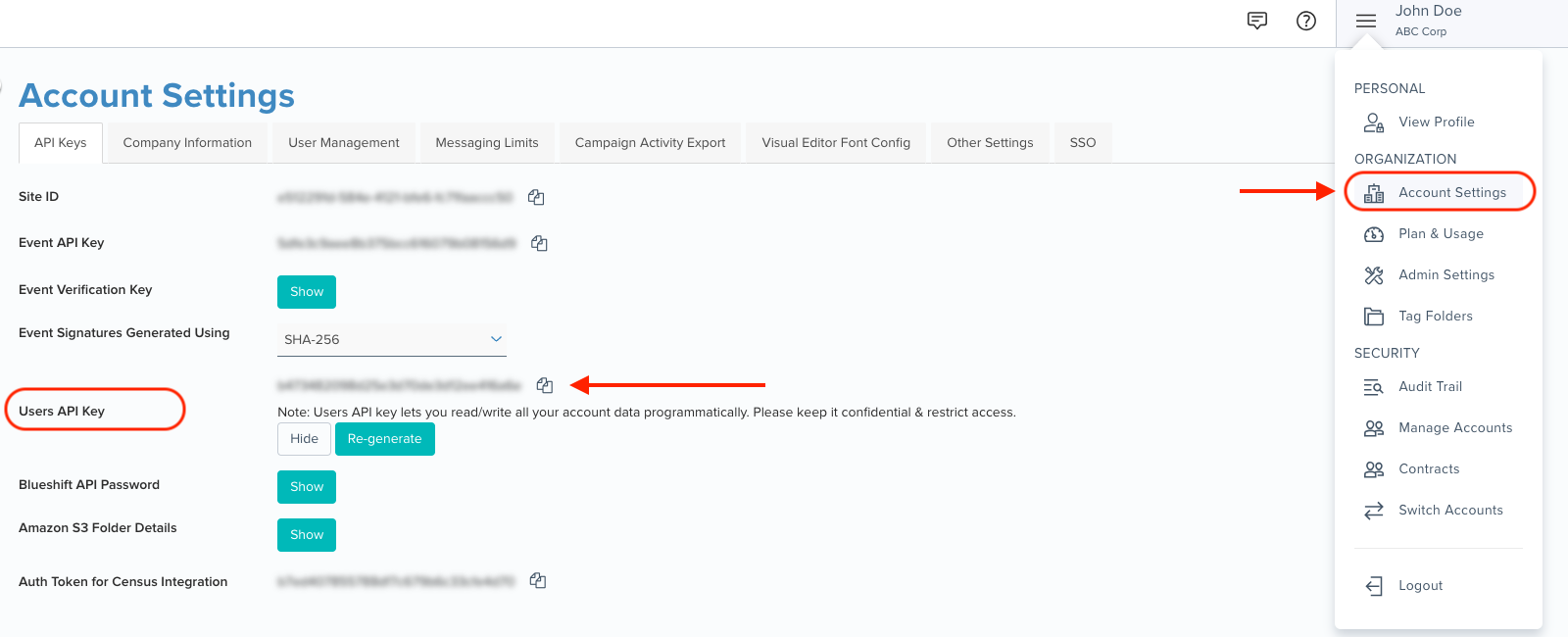
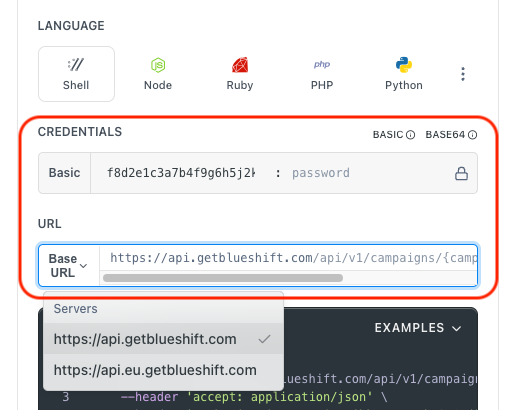
Authentication using Base64 encoding
Note for developers
API requests require authentication using HTTP Basic Authentication with an API key.
The API key serves as the username, while the password field should be left empty.
The format to encode is: your_api_key: (note the trailing colon).
This string must be Base64-encoded and included in the request's Authorization header as follows:
Authorization: Basic encoded\_value
You can generate the encoded value using a trusted
Base64 encoder.
Postman collection
Try it with Postman: Explore the API using Blueshift's Postman collection.
Things to know before you start
- S3 imports only: This endpoint currently supports imports with Amazon S3 as the data source. Imports from other sources (SFTP, Snowflake, Databricks, BigQuery) are not supported.
- Launched state required: The import must be in launched state. Imports in draft or paused state cannot be triggered via this endpoint.
- Scheduled or recurring imports only: The import must be either scheduled for a future date or configured as a recurring import.
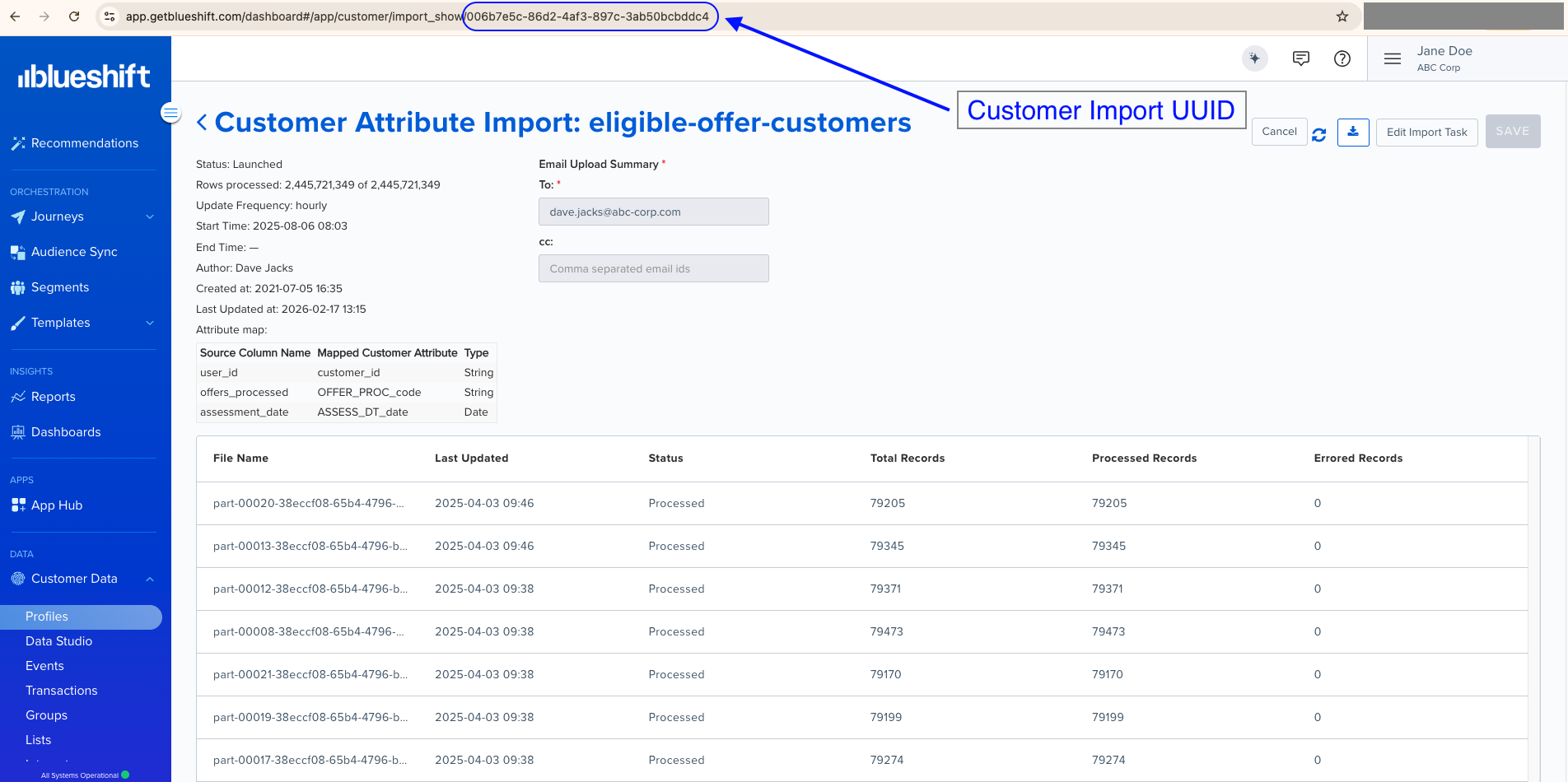
- Import task UUID required: Create and configure your import task in the Blueshift dashboard before using this endpoint. The UUID is available in the import task URL.
- Use case: Best for automating import triggers as part of a data pipeline or scheduled workflow.
Finding the customer import UUID > >You can find the customer import UUID in the URL when viewing a customer import task in the Blueshift app. For example, if you open a customer import task in the Blueshift app, its URL looks like
https://app.getblueshift.com/dashboard#/app/customer/import_show/<CUSTOMER_IMPORT_UUID>.
Request parameters
Check out the request parameters
Body parameters
| Parameter | Type | Required | Description |
|---|---|---|---|
uuid | string | ✅ Yes | The UUID of the customer attributes import task to trigger. You can find the UUID in the import task URL on the Blueshift dashboard. For example: https://app.getblueshift.com/dashboard#/app/customer/import_show/xxxxxxxx-xxxx-xxxx-xxxx-xxxxxxxxxxxx |
Example requests & responses
Trigger a customer attributes import
curl --request POST \
     --url https://api.getblueshift.com/api/v1/customer_attributes/trigger_import \
     --header 'accept: application/json' \
     --header 'authorization: Basic <YOUR_USER_API_KEY>' \
     --header 'content-type: application/json' \
     --data '{
       "uuid": "xxxxxxxx-xxxx-xxxx-xxxx-xxxxxxxxxxxx"
     }'
{
"status": "ok"
}API error responses
> Note
The following error codes are commonly returned by this endpoint.
| Status code | Description | Example response |
|---|---|---|
| 401 Unauthorized | API authentication failed due to an invalid or missing API key. | { "message": "Not authorized" } |
| 404 Not Found | The import task with the specified UUID was not found. | { "errors": [{ "title": "error", "detail": "Error: Resource not found" }] } |
| 405 Method Not Allowed | The import cannot be triggered. This can occur if the import source is not Amazon S3, the import is not in launched state, or the import is already being processed. | { "errors": [{ "title": "error", "detail": "Error: Action not supported" }] } |
| 429 Too Many Requests | The request limit has been exceeded. Reduce request frequency. | { "message": "Rate limit exceeded" } |
| 500 Internal Server Error | An unexpected server error occurred. Contact support if the issue persists. | { "message": "Internal Server Error - Please contact support for more information." } |
| 502 Bad Gateway | The server received an invalid response. Retry the request. | { "message": "Bad Gateway - Please retry the request." } |
| 503 Service Unavailable | The service is temporarily unavailable. Try again later. | { "message": "Service Unavailable - Try again later." } |
| 504 Gateway Timeout | The server took too long to respond. Retry with exponential backoff. | { "message": "Gateway Timeout - Retry with exponential backoff." } |
Method not allowed - The import cannot be triggered. This can occur if the import source is not Amazon S3, the import is not in launched state, or the import is already being processed.
Rate limit exceeded. Too many requests. Contact us at [email protected] for recommended throughput.
Internal server error. Contact Blueshift for more information.
Service unavailable, please retry. Bad gateway.
Service unavailable, please retry.
Service unavailable, please retry. Gateway timeout.