
Use this endpoint to get the list of external fetch templates.
API at a glance
Description: Retrieve all external fetch templates configured in your account. Returns template details including name, UUID, author, and timestamps. Supports pagination for large result sets.
Authentication & testing
Testing the API on this page
How to try it here
- Use your User API Key as the Username (leave Password blank).
- Select the appropriate API endpoint based on your Blueshift region.
- Enter the necessary parameters and click Try It to run the request.
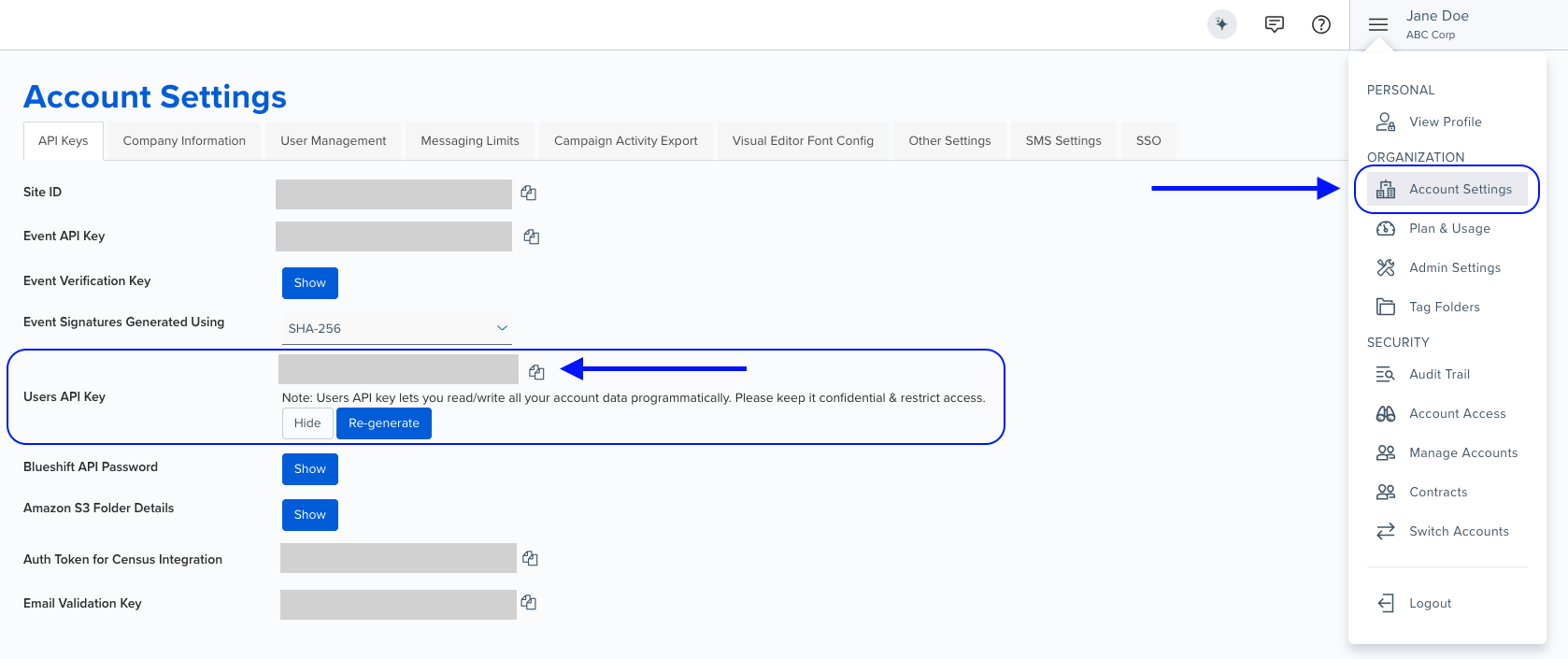
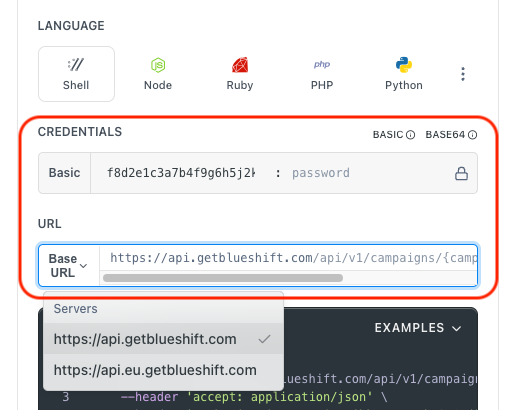
Authentication using Base64 encoding
Note for developers
API requests require authentication using HTTP Basic Authentication with an API key.
The API key serves as the username, while the password field should be left empty.
The format to encode is: your_api_key: (note the trailing colon).
This string must be Base64-encoded and included in the request's Authorization header as follows:
Authorization: Basic encoded_valueYou can generate the encoded value using a trusted Base64 encoder.
Postman collection
Try it with Postman: Explore the API using Blueshift's Postman collection.
Things to know before you start
- External fetch templates: Templates that define how to fetch external data sources for use in campaigns and personalizations.
- Pagination: Use
per_pageandpageparameters to navigate through results. - Template UUID: Each template has a unique UUID for referencing in other API calls.
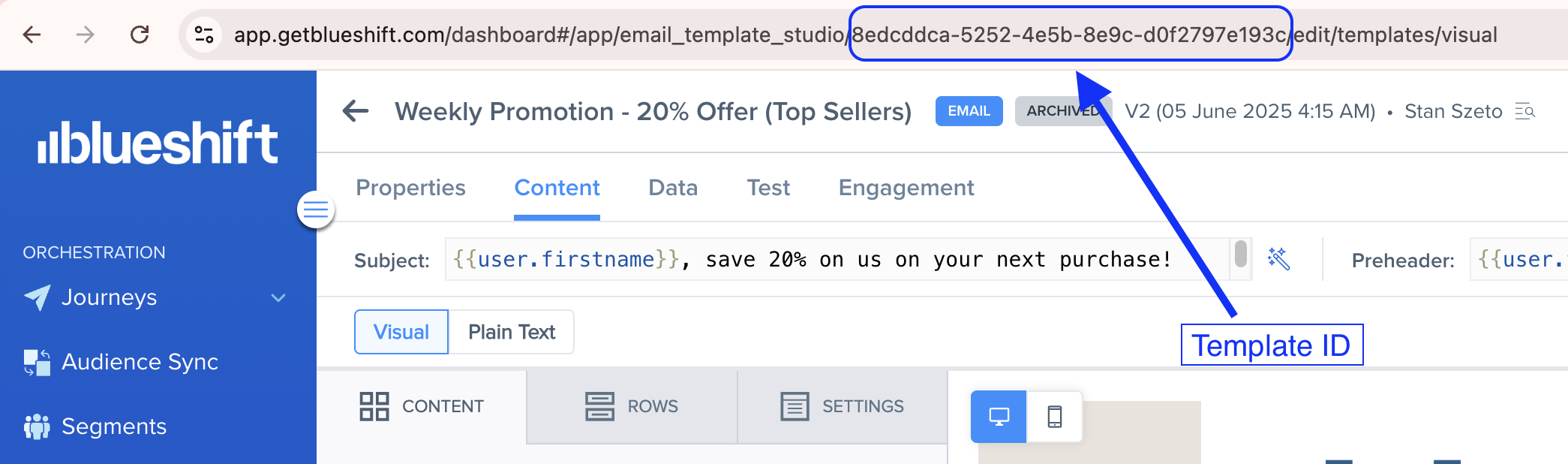
Finding the template UUID > >You can find the template UUID in the URL when viewing a segment in the Blueshift app. For example, if you open an email template (using visual editor) in the Blueshift app, its URL looks like
https://app.getblueshift.com/dashboard#/app/email_template_studio/8<TEMPLATE_UUID>/edit/templates/visual.
- Timestamps: Both creation and update timestamps are provided for each template.
Request parameters
Check out the request parameters
Query parameters
| Parameter | Type | Required | Description |
|---|---|---|---|
per_page | string | No | Number of records per page. Example: 2 |
page | string | No | Page number for pagination. Example: 2 |
Example requests & responses
List all external fetch templates
GET /api/v1/external_fetches.json{
"template": [
{
"name": "Product Recommendations",
"created_at": "2023-08-29T01:41:27.000Z",
"updated_at": "2023-08-29T05:15:39.000Z",
"uuid": "f8220927-20b7-409c-b970-8c17a24e1010",
"author": "Jane Doe",
"resource": {
"updated_at": "2023-08-29T05:15:39.000Z"
}
}
]
}List with pagination
GET /api/v1/external_fetches.json?per_page=2&page=2{
"template": [
{
"name": "Customer Preferences",
"created_at": "2023-09-15T10:20:15.000Z",
"updated_at": "2023-09-15T11:30:45.000Z",
"uuid": "a1b2c3d4-e5f6-7890-abcd-ef1234567890",
"author": "John Smith",
"resource": {
"updated_at": "2023-09-15T11:30:45.000Z"
}
},
{
"name": "Inventory Lookup",
"created_at": "2023-09-20T14:15:30.000Z",
"updated_at": "2023-09-20T14:15:30.000Z",
"uuid": "b2c3d4e5-f6a7-8901-bcde-f12345678901",
"author": "Sarah Johnson",
"resource": {
"updated_at": "2023-09-20T14:15:30.000Z"
}
}
]
}