
Use this endpoint to create a shared asset.
API at a glance
Description: This API allows you to create reusable HTML or Subject assets that can be referenced across email campaigns and templates.
For more information about shared assets, see Shared assets overview.
Supported asset types:
htmlsubject
Authentication & testing
Testing the API on this page
How to try it here
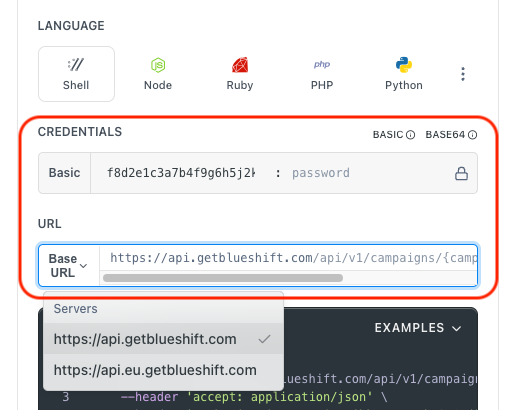
- Use your User API Key as the Username (leave Password blank).
- Select the appropriate API endpoint based on your Blueshift region.
- Enter the necessary parameters and click Try It to run the request.
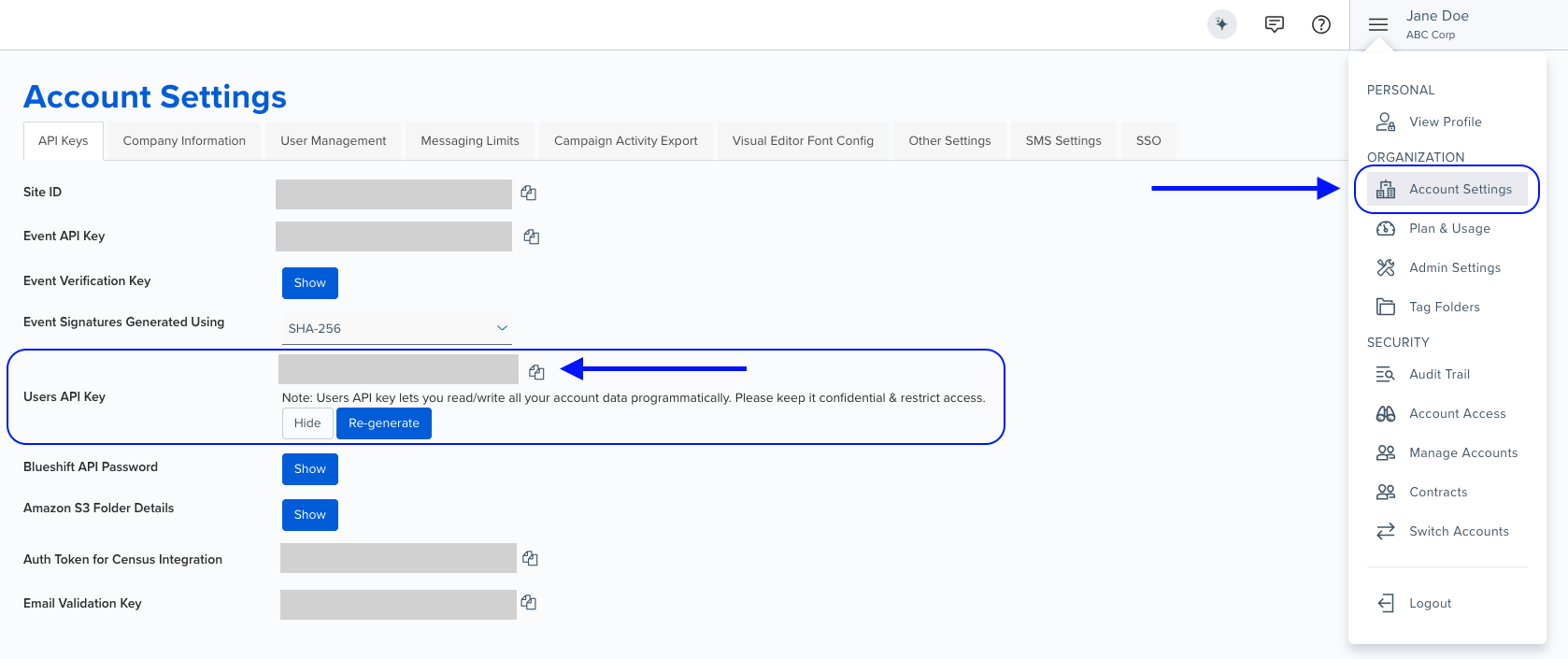
Authentication using Base64 encoding
Note for developers
API requests require authentication using HTTP Basic Authentication with an API key.
The API key serves as the username, while the password field should be left empty.
The format to encode is: your_api_key: (note the trailing colon).
This string must be Base64-encoded and included in the request's Authorization header as follows:
Authorization: Basic encoded_valueYou can generate the encoded value using a trusted Base64 encoder.
Postman collection
Try it with Postman: Explore the API using Blueshift's Postman collection.
Things to know before you start
- Only HTML and Subject asset types are supported via the external API. Other asset types (rich_text, visual_editor) are not available.
- The
shareable_namefield is automatically generated from thedisplay_namefield. You cannot provide a custom shareable_name. - The
asset_typefield cannot be changed after creation. - For HTML assets: If you don't provide a
plain_textfield, Blueshift will auto-generate it from the HTML content. - For Subject assets: The
plain_textandis_plain_text_customfields do not apply and will be returned asnull. - Use case: Create reusable content blocks for email templates, such as headers, footers, promotional banners, or subject lines.
How shareable_name is generated
The shareable_name is automatically created from your display_name using these rules:
- Prefix:
bsft_is added at the beginning - Whitespace: All spaces are replaced with underscores (
_) - Special characters: All non-alphanumeric characters (except underscores) are removed
Example: "Welcome Email" becomes bsft_Welcome_Email
Request parameters
Check out the request parameters
Common parameters
Note: All parameters listed here apply to both HTML and Subject asset types unless specified otherwise.
Parameter | Type | Required | Description |
|---|---|---|---|
|
| ✅ Yes | Human-readable name for the asset. This value is used to auto-generate the |
|
| ✅ Yes | The actual content of the asset.
|
|
| ✅ Yes | Type of asset to create. Must be either Note: Cannot be changed after creation. |
|
| ❌ No | Plain text version of the HTML content.
Applicable only for HTML assets. |
|
| ❌ No | Set to
Applicable only for HTML assets. |
|
| ❌ No | Email address of the user to attribute as the asset's author. Must be a valid, existing user on the account.
|
Example requests & responses
Create HTML asset
{
  "display_name": "Welcome Email Header",
  "content": "<h1>Welcome to our store!</h1>",
  "asset_type": "html"
}
{
"uuid": "a1b2c3d4-e5f6-7890-abcd-ef1234567890",
"asset_type": "html",
"shareable_name": "bsft_Welcome_Email_Header",
"display_name": "Welcome Email Header",
"author": "John Doe",
"email": "[email protected]",
"content": "<h1>Welcome to our store!</h1>",
"plain_text": null,
"is_plain_text_custom": false,
"updated_at": "2026-01-28T08:00:00.000Z",
"tag_data": ""
}Create HTML asset with custom plain text
{
  "display_name": "Product Announcement",
  "content": "<h2>New Product Launch</h2><p>Check out our latest collection.</p>",
  "asset_type": "html",
  "plain_text": "New Product Launch - Check out our latest collection.",
  "is_plain_text_custom": true
}
{
"uuid": "b2c3d4e5-f6a7-8901-bcde-f12345678901",
"asset_type": "html",
"shareable_name": "bsft_Product_Announcement",
"display_name": "Product Announcement",
"author": "John Doe",
"email": "[email protected]",
"content": "<h2>New Product Launch</h2><p>Check out our latest collection.</p>",
"plain_text": "New Product Launch - Check out our latest collection.",
"is_plain_text_custom": true,
"updated_at": "2026-01-28T08:00:00.000Z",
"tag_data": ""
}Create Subject asset
{
  "display_name": "Welcome Subject Line",
  "content": "Welcome to our community!",
  "asset_type": "subject"
}
{
"uuid": "c3d4e5f6-a7b8-9012-cdef-234567890123",
"asset_type": "subject",
"shareable_name": "bsft_Welcome_Subject_Line",
"display_name": "Welcome Subject Line",
"author": "John Doe",
"email": "[email protected]",
"content": "Welcome to our community!",
"plain_text": null,
"is_plain_text_custom": null,
"updated_at": "2026-01-28T08:00:00.000Z",
"tag_data": ""
}Create HTML asset attributed to a specific author
{
  "display_name": "Fall Sale Promo Banner",
  "content": "<h2>Fall Sale — 25% Off Everything</h2><p>Shop the collection before it's gone.</p>",
  "asset_type": "html",
  "author": "[email protected]"
}
{
"uuid": "faea82ad-4bbf-4ac2-8500-1d54957718c6",
"asset_type": "html",
"shareable_name": "bsft_Fall_Sale_Promo_Banner",
"display_name": "Fall Sale Promo Banner",
"author": "Stefanie Moore",
"email": "[email protected]",
"content": "<h2>Fall Sale — 25% Off Everything</h2><p>Shop the collection before it's gone.</p>",
"plain_text": null,
"is_plain_text_custom": false,
"updated_at": "2026-07-30T15:37:17.534Z",
"tag_data": ""
}Response fields explained
Check out the response fields
| Field | Description |
|---|---|
uuid | Unique identifier for the shared asset. Use this value when updating the asset. |
asset_type | Type of the asset (html or subject). |
shareable_name | Auto-generated unique identifier based on display_name. Format: bsft_<sanitized_display_name>. |
display_name | Human-readable name for the asset. |
author | Name of the user who created the asset. |
email | Email of the user who created the asset. |
content | The actual content of the asset (HTML or subject line text). |
plain_text | Plain text version of the content. null if not provided for HTML assets or not applicable for Subject assets. |
is_plain_text_custom | Indicates whether plain text is custom (true) or auto-generated (false). null for Subject assets. |
updated_at | Timestamp of when the asset was last updated (ISO 8601 format). |
tag_data | Tags associated with the asset. |
Common error scenarios
Common error scenarios you may encounter
| Status code | Description | Example response |
|---|---|---|
| 401 Unauthorized | API authentication failed due to invalid or missing API key. | HTTP Basic: Access denied. |
| 422 Unprocessable Entity | Duplicate shareable_name (generated from display_name already exists). | { "errors": [{ "title": "shareable_name", "detail": "Shareable_name: This template name is already in use, please use a different name" }], "meta": { "combine_errors": false, "no_toast": false, "unformatted": { "shareable_name": ["This template name is already in use..."] } } } |
| 422 Unprocessable Entity | Missing required field (display_name, content, or asset_type is missing). | { "errors": [{ "title": "shareable_name", "detail": "Shareable_name: can't be blank" }], "meta": { "combine_errors": false, "no_toast": false, "unformatted": { "shareable_name": ["can't be blank"] } } } |
| 500 Internal Server Error | An unexpected server error occurred. | { "status": "500", "error": "Internal Server Error" } |