
Use this endpoint to get the list of campaigns.
API at a glance
Description: This API returns a list of campaigns based on the specified search criteria. You can filter by name, author, creation date, start date, status, campaign type, and archived status. Results are paginated.
Authentication & testing
Testing the API on this page
How to try it here
- Use your User API Key as the Username (leave Password blank).
- Select the appropriate API endpoint based on your Blueshift region.
- Enter the necessary parameters and click Try It to run the request.
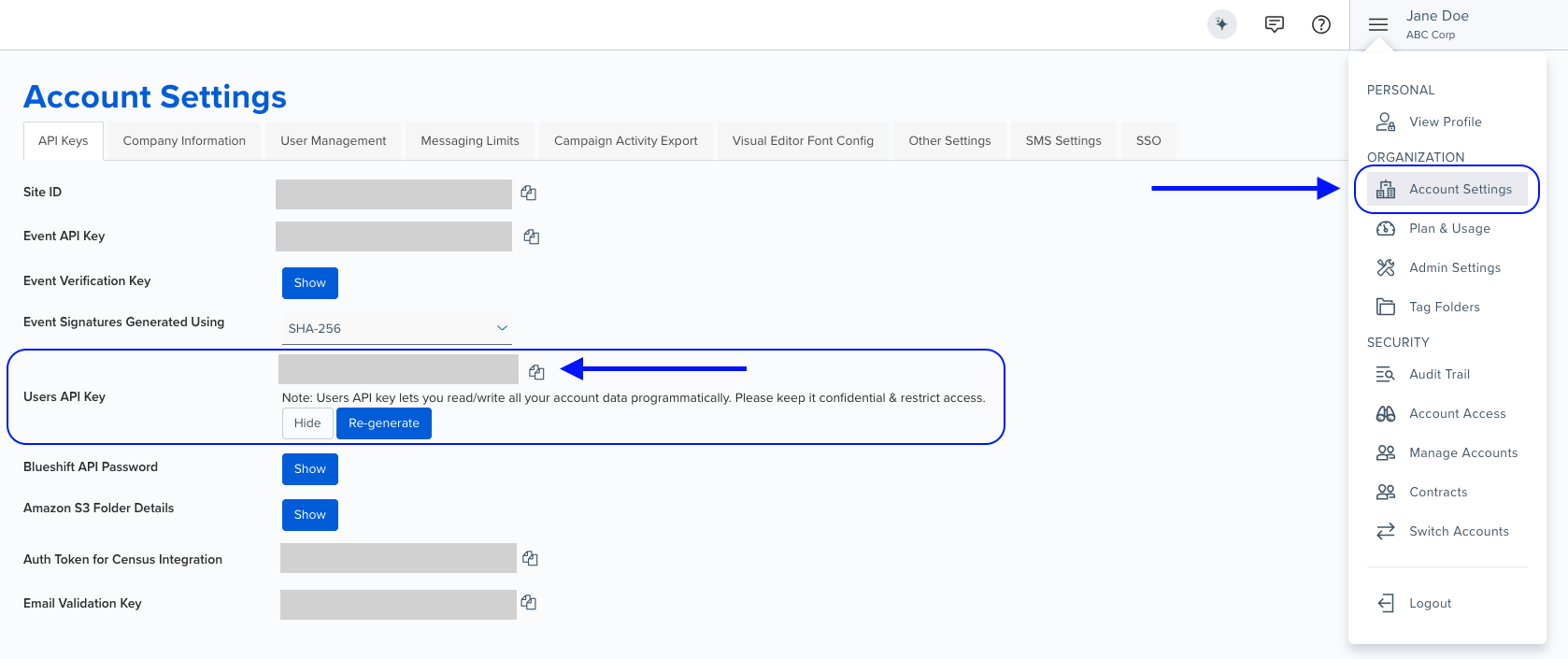
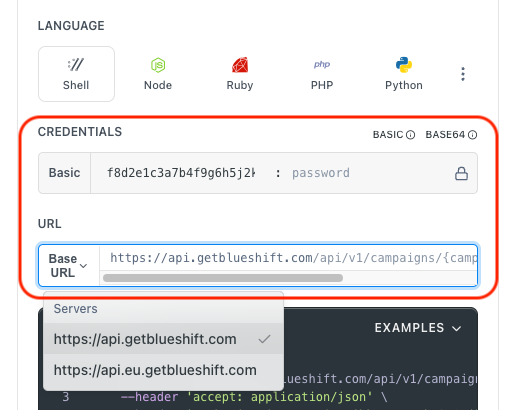
Authentication using Base64 encoding
Note for developers
API requests require authentication using HTTP Basic Authentication with an API key.
The API key serves as the username, while the password field should be left empty.
The format to encode is: your_api_key: (note the trailing colon).
This string must be Base64-encoded and included in the request's Authorization header as follows:
Authorization: Basic encoded_valueYou can generate the encoded value using a trusted Base64 encoder.
Postman collection
Try it with Postman: Explore the API using Blueshift's Postman collection.
Things to know before you start
- Pagination: Use
per_pageandpageparameters to control result pagination. - Default behavior for one-time campaigns: If
startdateis not specified, the response contains only one-time campaigns with a start date within the last 30 days. For other campaign types, all campaigns are returned regardless of start date. - Multiple filters: You can combine multiple query parameters to narrow down results.
- Campaign types: Use
exec_termto filter by type:one_time,recurring,on_going(segment triggered),transactional(event triggered), oronsite(live content). - Use case: Best for retrieving lists of campaigns for dashboards, reports, or administrative interfaces.
Request parameters
Check out the request parameters
Query parameters
Note: All query parameters are optional.
Parameter | Type | Required | Description |
|---|---|---|---|
|
| ❌ No | Search for campaigns that contain the specified string in the name of the campaign. |
|
| ❌ No | Search for campaigns created by specified author. |
|
| ❌ No | Search for campaigns created after specified date and time. |
|
| ❌ No | Search for campaigns created before specified date and time. |
|
| ❌ No | Search for campaigns that started after specified date and time. If the start date is not specified, for one time campaigns, response contains only campaigns that have a start date within the last 30 days. For other campaign types, if start date is not specified, all campaigns are returned irrespective of start date. |
|
| ❌ No | Search for campaigns with specified archived status. Set as |
|
| ❌ No | Search for campaigns with specified status. |
|
| ❌ No | Search for campaigns of specified type.
|
|
| ❌ No | Specify the number of records to be returned per page. |
|
| ❌ No | Specify the page number for the search results. |
Example requests & responses
List campaigns with filters
Request
curl --request GET \
     --url 'https://api.getblueshift.com/api/v2/campaigns.json?status=launched&exec_term=one_time&per_page=4&page=3' \
     --header 'accept: application/json' \
     --header 'authorization: Basic <YOUR_API_KEY>'
Response
[
  {
    "name": "Members-only Banner",
    "status": "launched",
    "startdate": "2024-05-22T02:26:00.000Z",
    "created_at": "2024-05-21T07:05:00.000Z",
    "updated_at": "2024-05-24T07:05:00.000Z",
    "uuid": "a1b2c3d4-e5f6-7890-1234-567890abcdef",
    "exec_term": "one_time",
    "next_execution_scheduled_at": null,
    "archived": false,
    "holdout_percentage": 0,
    "segment_uuid": "seg-uuid-123",
    "segment_name": "VIP Members",
    "author": "Jane Doe",
    "email": "[email protected]",
    "prioritization_label": null
  }
]