
Use this endpoint to create a Cloud App template.
API at a glance
Description: This API creates a Cloud App template in your Blueshift account. You set the endpoint that Blueshift calls, the HTTP method, the request content, headers and authentication. You can link the template to a Cloud App, or leave it out to create a Custom JSON template.
Authentication & testing
Testing the API on this page
How to try it here
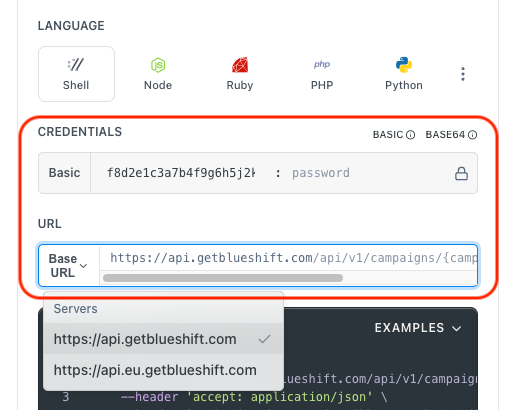
- Use your User API Key as the Username (leave Password blank).
- Select the appropriate API endpoint based on your Blueshift region.
- Enter the necessary parameters and click Try It to run the request.
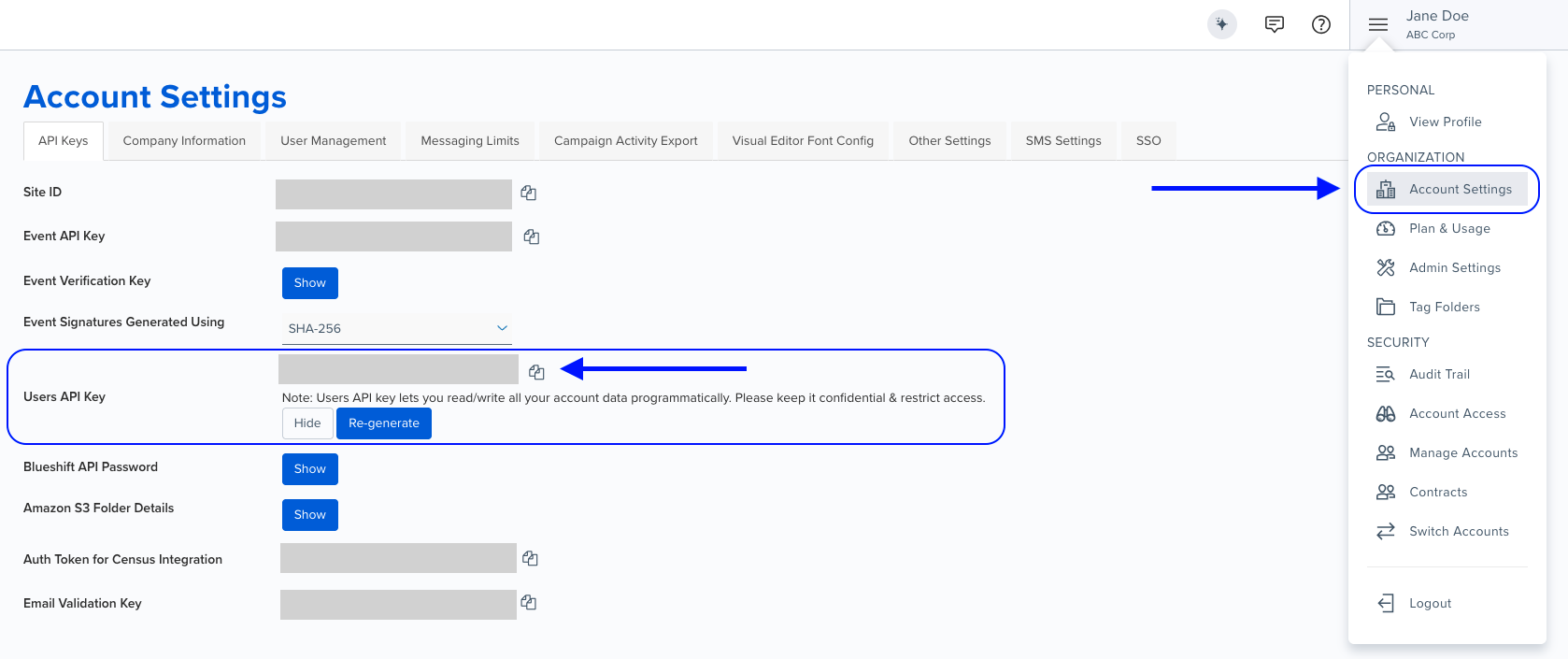
Authentication using Base64 encoding
Note for developers
API requests require authentication using HTTP Basic Authentication with an API key.
The API key serves as the username, while the password field should be left empty.
The format to encode is: your_api_key: (note the trailing colon).
This string must be Base64-encoded and included in the request's Authorization header as follows:
Authorization: Basic encoded_valueYou can generate the encoded value using a trusted Base64 encoder.
Postman collection
Try it with Postman: Explore the API using Blueshift's Postman collection.
Things to know before you start
- API key: Use your User API key.
- Cloud Apps: Cloud Apps must be enabled for your account. Otherwise, the API returns
403. - Required fields:
name,resource.external_webhook_url,resource.http_methodandresource.content. - Unique name: The name must be unique among your account's Cloud App templates. Names aren't case-sensitive.
- Content:
contentmust be valid JSON. It can contain Liquid, such as{{user.email}}. Blueshift checks the JSON with Liquid filled in as empty values, so put Liquid inside quotes:"age": "{{user.age}}", not"age": {{user.age}}. - Authentication: Send
auth_headerandauth_tokentogether, or leave both out. Each can be up to 200 characters. When you send them,external_webhook_urlmust start withhttps://or with Liquid. - Auth token:
auth_tokenis never returned. Responses show***. - Author: Send
authorwith the email address of an active user in your account. If you leave it out, or the email doesn't match an active user, the account's primary user becomes the author. - Cloud App:
app_uuidmust be a Cloud App your account can use. You can't change it after you create the template. - Copying an auth token: To copy an existing Cloud App template's auth token, send
clone_idwith its UUID and setresource.auth_tokento***. If no Cloud App template in your account has that UUID, the API returns422. Without***,clone_idis ignored. - External fetches and transaction mixins: Send them as objects with a
uuid. UUIDs that don't match an external fetch or segment are ignored. - Recommendations:
account_algorithm_uuidmust be an active recommendation scheme in your account. To setskip_on_all_blank_recommendation_blockstotrue, also sendskip_user_on_blank_products: false. - Not available through the API: deleting, previewing and test-sending a template. Use the Blueshift app for these.
- Use case: Best for creating Cloud App templates from your own tools and scripts.
Request parameters
Check out the request parameters
Body parameters
| Parameter | Type | Required | Description |
|---|---|---|---|
name | string | ✅ Yes | Name of the template. |
resource | object | ✅ Yes | The request that Blueshift sends. See structure below. |
author | string | ❌ No | Email address of the template's author. |
tag_data | string | ❌ No | Folder and tags, in the format folder_name:tag1,tag2. Separate folders with |. The folder must already exist in your account. If the folder has a list of allowed tags, each tag must be on it. Otherwise, the API returns 422. |
skip_user_on_external_fetch_error | boolean | ❌ No | If true, Blueshift doesn't send the request for a customer when an external fetch fails. |
external_fetches | array | ❌ No | External fetches to use, as objects with a uuid. For example, [{"uuid": "<external fetch UUID>"}]. |
transaction_mixins | array | ❌ No | Transaction mixins to use, as objects with a uuid. |
template_properties | object | ❌ No | Recommendation settings. Keys: account_algorithm_uuid (an active recommendation scheme in your account; null removes it), skip_user_on_blank_products (default true), skip_user_on_blank_event_products (default true) and skip_on_all_blank_recommendation_blocks (default false). skip_user_on_blank_products and skip_on_all_blank_recommendation_blocks can't both be true. Responses return this as an array. |
clone_id | string | ❌ No | UUID of another Cloud App template in your account. Send it with resource.auth_token set to *** to copy that template's auth token into the new template. |
Resource object
| Parameter | Type | Required | Description |
|---|---|---|---|
external_webhook_url | string | ✅ Yes | The endpoint Blueshift calls. Starts with http:// or https://, or with Liquid. |
http_method | string | ✅ Yes | POST, PUT, PATCH or GET. |
content | string | ✅ Yes | Request content as a JSON string. Can contain Liquid. |
headers | object | ❌ No | HTTP headers to send, as key-value pairs. |
auth_header | string | ❌ No | Name of the authentication header, for example Authorization. |
auth_token | string | ❌ No | Value of the authentication header. |
app_uuid | string | ❌ No | UUID of the Cloud App this template uses. Leave it out for a Custom JSON template. |
account_app_profile_uuid | string | ❌ No | UUID of an enabled Cloud App connection in your account. If you set it, Blueshift uses the connection's authentication instead of auth_header and auth_token. |
context | string | ❌ No | A sample event as a JSON string, used when you preview or test the template in the Blueshift app. |
is_url_encoded_form | boolean | ❌ No | If true, Blueshift sends the content as a URL-encoded form. |
dedupe_field | string | ❌ No | Name of a customer attribute that identifies each customer for this template (Unique Sent Identifier in the Blueshift app). Blueshift doesn't send the request for customers who don't have this attribute. |
use_json_editor | boolean | ❌ No | If true, the template opens in the JSON editor in the Blueshift app. If false (default), it opens in the form editor. |
content_metadata | object | ❌ No | Field layout for the form editor in the Blueshift app. |
Example requests & responses
Create a Custom JSON template
Request
curl --request POST \
     --url 'https://api.getblueshift.com/api/v1/webhook_templates.json' \
     --header 'accept: application/json' \
     --header 'authorization: Basic <YOUR_API_KEY>' \
     --header 'content-type: application/json' \
     --data '{
       "name": "Order confirmation webhook",
       "resource": {
         "external_webhook_url": "https://example.com/orders",
         "http_method": "POST",
         "content": "{ \"email\": \"{{user.email}}\" }"
       }
     }'
Response
{
  "name": "Order confirmation webhook",
  "created_at": "2026-11-19T05:53:43.140Z",
  "updated_at": "2026-11-19T05:53:43.140Z",
  "uuid": "75f48ce5-7955-48d9-a06d-88732b1b079f",
  "skip_user_on_external_fetch_error": null,
  "archived": false,
  "author": "Jane Doe",
  "template_properties": [],
  "tag_data": "",
  "external_fetches": [],
  "transaction_mixins": [],
  "resource": {
    "auth_header": null,
    "http_method": "POST",
    "external_webhook_url": "https://example.com/orders",
    "content": "{ \"email\": \"{{user.email}}\" }",
    "dedupe_field": null,
    "context": null,
    "is_url_encoded_form": false,
    "headers": null,
    "content_metadata": null,
    "use_json_editor": false,
    "auth_token": null,
    "app_uuid": null,
    "account_app_profile_uuid": null,
    "app_name": null
  }
}
Unknown Cloud App
Response (422)
{
  "errors": [
    {
      "detail": "Cannot find cloud app with uuid=00000000-0000-0000-0000-000000000000"
    }
  ],
  "meta": {
    "combine_errors": false,
    "no_toast": false
  }
}