
Use this endpoint to update a Cloud App template.
API at a glance
Description: This API updates a Cloud App template in your Blueshift account. Send only the fields you want to change.
Authentication & testing
Testing the API on this page
How to try it here
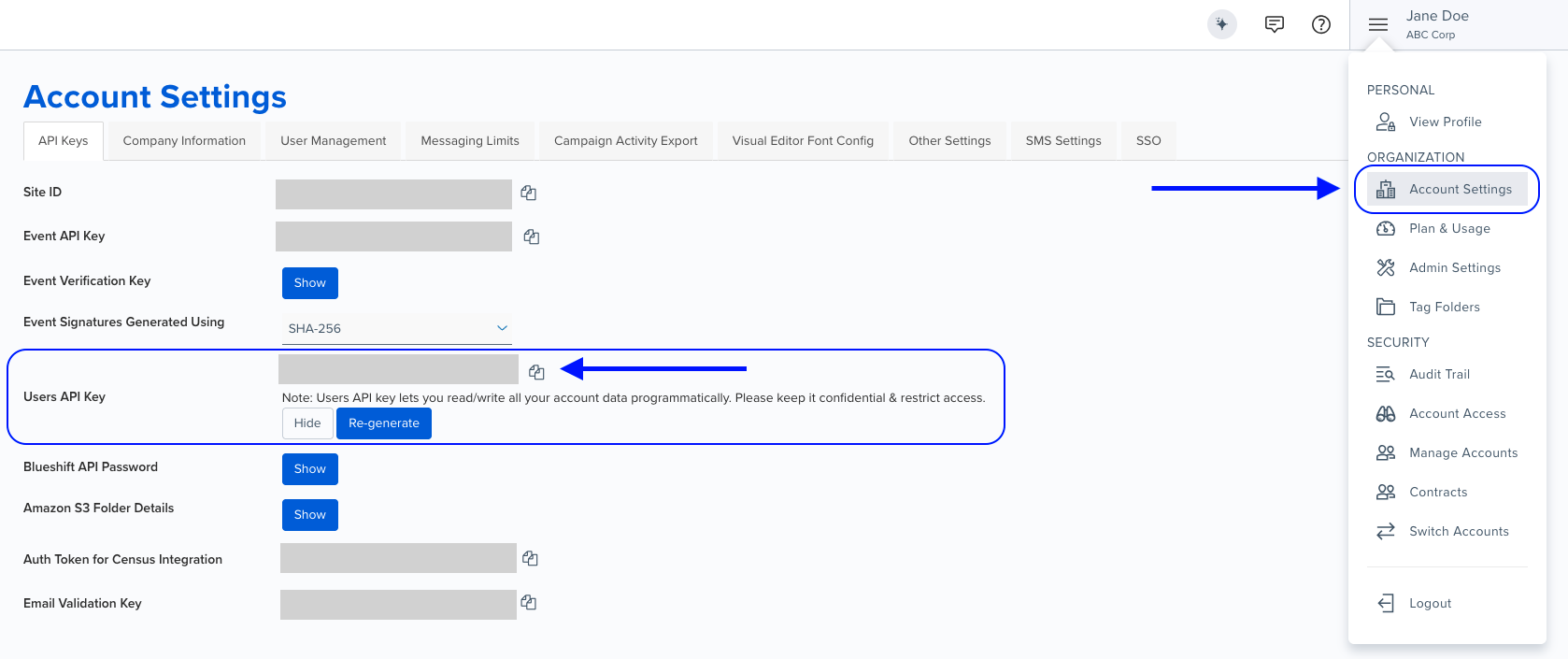
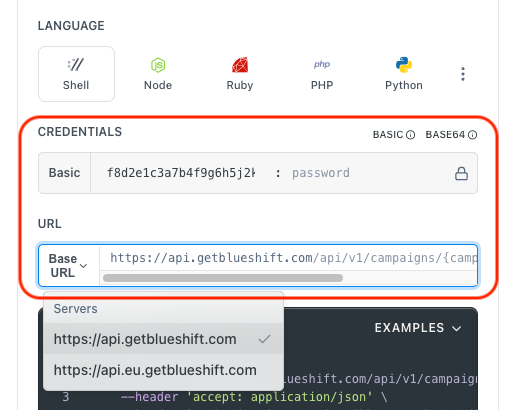
- Use your User API Key as the Username (leave Password blank).
- Select the appropriate API endpoint based on your Blueshift region.
- Enter the necessary parameters and click Try It to run the request.
Authentication using Base64 encoding
Note for developers
API requests require authentication using HTTP Basic Authentication with an API key.
The API key serves as the username, while the password field should be left empty.
The format to encode is: your_api_key: (note the trailing colon).
This string must be Base64-encoded and included in the request's Authorization header as follows:
Authorization: Basic encoded_valueYou can generate the encoded value using a trusted Base64 encoder.
Postman collection
Try it with Postman: Explore the API using Blueshift's Postman collection.
Things to know before you start
- API key: Use your User API key.
- Partial update: Only the fields you send change. Fields you leave out keep their current values. This includes
external_fetches,transaction_mixinsandtag_data. - Replacing lists and tags: When you send
external_fetches,transaction_mixinsortag_data, what you send replaces the current value. Send an empty array, or an emptytag_datastring, to remove them all. - Auth token: Send a new value to replace the token, or
***to keep it. To remove authentication, send bothauth_headerandauth_tokenas empty strings. - Headers: When you send
headersorcontent_metadata, what you send replaces the whole object. You can't changecontent_metadataon a quick start template. - Recommendations:
account_algorithm_uuidmust be an active recommendation scheme in your account. To setskip_on_all_blank_recommendation_blockstotrue, also sendskip_user_on_blank_products: false. - Cloud App connection: You can change
account_app_profile_uuid, but you can't remove it. - Can't change:
app_uuid,author. If you send them, they're ignored. - AI-generated templates: You can't update a template that was generated by AI. The API returns
403. - Same rules as create: The name must stay unique,
contentmust be valid JSON with Liquid inside quotes, andauth_headerandauth_tokengo together. - Not available through the API: deleting, previewing and test-sending a template. Use the Blueshift app for these.
Request parameters
Check out the request parameters
Path parameters
| Parameter | Type | Required | Description |
|---|---|---|---|
template_uuid | string | ✅ Yes | The UUID of the Cloud App template. |
Body parameters
All body parameters are optional. They're the same as for Create a Cloud App template, except author and resource.app_uuid.
| Parameter | Type | Description |
|---|---|---|
name | string | Name of the template. |
tag_data | string | Folder and tags, in the format folder_name:tag1,tag2. Separate folders with |. The folder must already exist in your account. If the folder has a list of allowed tags, each tag must be on it. Otherwise, the API returns 422. Replaces all the template's tags. Folders you leave out are removed. |
skip_user_on_external_fetch_error | boolean | If true, Blueshift doesn't send the request for a customer when an external fetch fails. |
external_fetches | array | Replaces the template's external fetches. Objects with a uuid. |
transaction_mixins | array | Replaces the template's transaction mixins. Objects with a uuid. |
template_properties | object | Recommendation settings. Keys you leave out keep their current values. Keys: account_algorithm_uuid (an active recommendation scheme in your account; null removes it), skip_user_on_blank_products (default true), skip_user_on_blank_event_products (default true) and skip_on_all_blank_recommendation_blocks (default false). skip_user_on_blank_products and skip_on_all_blank_recommendation_blocks can't both be true. Responses return this as an array. |
resource | object | Any of external_webhook_url, http_method, content, headers, auth_header, auth_token, account_app_profile_uuid, context, is_url_encoded_form, dedupe_field, use_json_editor, content_metadata. |
Example requests & responses
Rename a template and change its request
Request
curl --request PUT \
     --url 'https://api.getblueshift.com/api/v1/webhook_templates/75f48ce5-7955-48d9-a06d-88732b1b079f.json' \
     --header 'accept: application/json' \
     --header 'authorization: Basic <YOUR_API_KEY>' \
     --header 'content-type: application/json' \
     --data '{
       "name": "Order confirmation webhook v2",
       "resource": {
         "content": "{ \"email\": \"{{user.email}}\", \"src\": \"api\" }",
         "auth_header": "Authorization",
         "auth_token": "<YOUR_ENDPOINT_TOKEN>",
         "headers": {
           "X-Source": "blueshift"
         }
       }
     }'
Response
{
  "name": "Order confirmation webhook v2",
  "created_at": "2026-11-19T05:53:43.000Z",
  "updated_at": "2026-11-19T05:53:52.209Z",
  "uuid": "75f48ce5-7955-48d9-a06d-88732b1b079f",
  "skip_user_on_external_fetch_error": null,
  "archived": false,
  "author": "Jane Doe",
  "template_properties": [
    {
      "name": "products",
      "context": {
        "product_count": 20
      },
      "settings": {
        "product_count": 20
      },
      "skip_user_on_blank_products": true,
      "skip_user_on_blank_event_products": true,
      "skip_on_all_blank_recommendation_blocks": false,
      "account_algorithm_uuid": null
    }
  ],
  "tag_data": "",
  "external_fetches": [],
  "transaction_mixins": [],
  "resource": {
    "auth_header": "Authorization",
    "http_method": "POST",
    "external_webhook_url": "https://example.com/orders",
    "content": "{ \"email\": \"{{user.email}}\", \"src\": \"api\" }",
    "dedupe_field": null,
    "context": null,
    "is_url_encoded_form": false,
    "headers": {
      "X-Source": "blueshift"
    },
    "content_metadata": null,
    "use_json_editor": false,
    "auth_token": "***",
    "app_uuid": null,
    "account_app_profile_uuid": null,
    "app_name": null
  }
}
Content isn't valid JSON
Response (422)
{
  "errors": [
    {
      "title": "content",
      "detail": "Content: invalid JSON: not a number or other value at line 1, column 1 [parse.c:422]"
    }
  ],
  "meta": {
    "combine_errors": false,
    "no_toast": false,
    "unformatted": {
      "content": [
        "invalid JSON: not a number or other value at line 1, column 1 [parse.c:422]"
      ]
    }
  }
}
Template not found
Response (404)
{
  "message": "Not Found"
}